

Jira is a powerful project management and software development solution that helps you move work from “to-do” lists to “done” and enhances workflows through customization, actual time reporting, and smooth integrations with solutions like Confluence, Slack, and Git. Whatever the size of your organization, Jira’s agility and flexibility allow teams to plan sprints, check progress, and create roadmaps in a single system of record. Developed in 2002 as a tool for coders to track bugs, Jira has evolved as an exhaustive work-management suite, namely Jira Software for agile development, Jira Service Management for IT operations, and Jira Work Management for business teams.
Recent developments in cloud architecture, no-code automation, and AI assistants revolutionize Jira into a hub that predicts bottlenecks, automates tasks, and equips data-driven decision making.
In this article, we will explore everything you need to know about the Jira ticketing tool, covering core functions, benefits and best practices.
What is a Jira ticketing system?
The Jira Ticketing System is an industry standard for managing support, enabling users to report bugs, complete tasks, and submit service requests. Its robust centralized design allows project teams to manage tasks, issues and projects effectively. Jira enables teams to create “tickets” – a work item that encapsulates the details of the issue, such as problem summary, detailed description and current status.
The Jira ticketing tool is fully customizable, allowing organizations to tailor workflows, departments, and processes to meet their unique requirements. Initially started as a bug-tracking tool, Jira is now used widely for project management.
Jira works for organizations of all kinds and sectors, from IT and software development to Sales and marketing. The ticketing system also works with different formats such as Kanban, Scrum, and Agile. With its integration capabilities it creates a robust environment that boosts productivity.
How Jira ticketing works
Groups that usually report technical issues include product managers and developers, company employees, customers and outside stakeholders. Jira works by creating, supervising, and resolving tickets throughout a project’s lifecycle. Here’s a breakdown of its key functions:
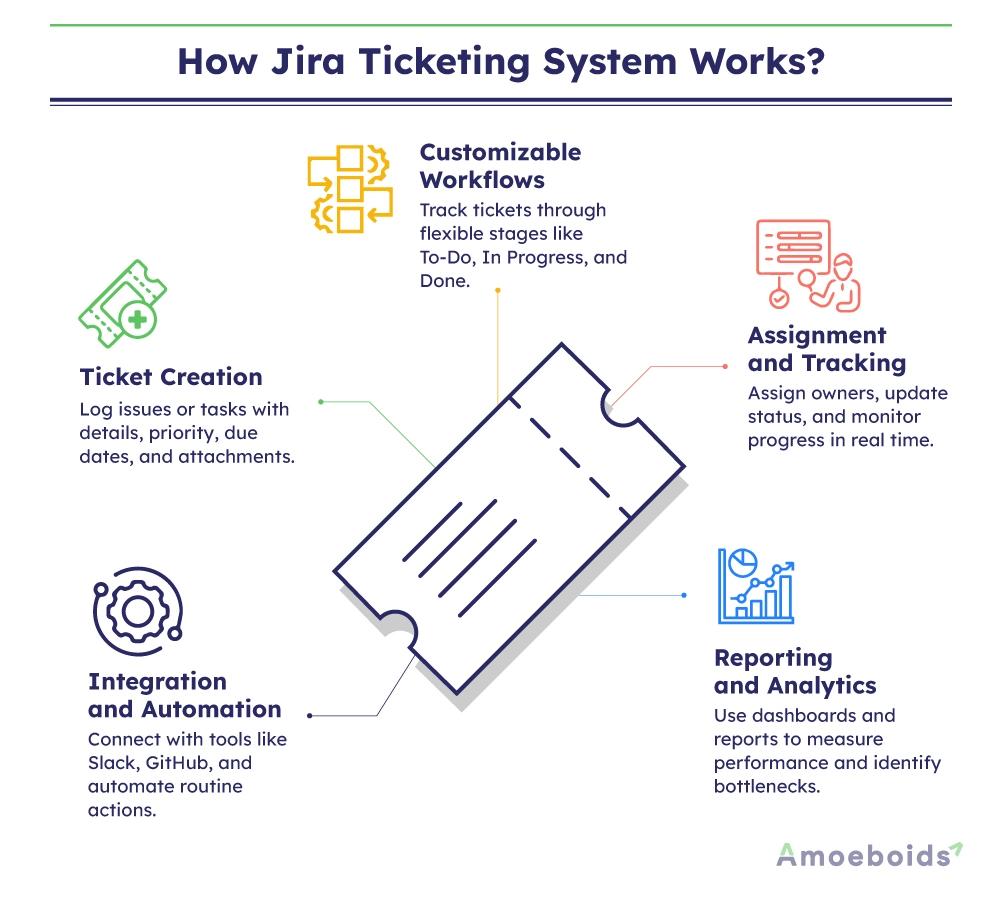
- Ticket creation: Users begin by creating a new ticket and entering the necessary details of the task or issue. Additional information, such as priority, due date, and attachments (including documents, screenshots, and remarks), is added to ensure that all necessary details are available from a single source.
- Customizable workflows: Jira tickets enable users to track and document the journey of a ticket from creation to resolution. Customizable workflows can design stages that replicate internal processes such as “to-do,” “in progress,” “review,” “rework,” and “done.” Such flexibility ensures that the Atlassian ticketing tool aligns perfectly with how work is tracked and completed.
- Assignment and tracking: Tickets are assigned to team members who are responsible for their completion and follow-up. As work progresses, statuses are updated, time is logged, and comments are added. This real-time tracking provides a bird’s-eye view of the operation, offering transparency and enabling the management of deadlines through proper workload distribution.
- Integration and automation: As stated, the Jira ticketing tool is renowned for its seamless integration and for fostering a productive environment through a cohesive network of tools. It integrates with communication platforms, code repositories, and various other tools, allowing for the automation of repetitive tasks.
- Reporting and analytics: Jira tickets are equipped with powerful reporting tools, including customizable dashboards, burndown charts, and velocity reports. It helps teams monitor progress, identify bottlenecks, and predict future workloads, enabling data-informed decision-making.
Tickets help keep everyone informed and up to date regarding progress on tasks or fixes. They also offer numerous additional benefits.
Benefits of using Jira for ticketing
Jira helps maintain the agility needed to adapt to changing project requirements and priorities. It provides tools to manage backlogs, plan sprints, and effectively track issues. Implementing the Jira ticketing system offers several significant benefits as well:
Enhanced collaboration
Jira consolidates all project-related information down to a single ticket. This makes it easier for team members to work and collaborate. Comments, attachments and status updates are visible to everyone, ensuring all team members are informed. It enhances collaboration, reduces misunderstandings, and accelerates the resolution of issues.
Improved visibility and accountability
Jira enables you to track every ticket from start to finish with complete transparency. Everyone involved in the project can check individual tasks, check issues, and implement accountability. This visibility ensures punctuality and budget compliance for projects.
Flexibility and customization
A key factor behind Jira tickets’ applicability is their flexibility. The Atlassian ticketing system can be customized to fit your team’s specific processes. It fits perfectly with Agile, Kanban, and Scrum methodologies. High levels of customization across workflows, fields and ticket types result in Jira’s adaptability to any project size or complexity.
Efficient resource allocation
Managers gain a clear understanding of every individual’s activity in real-time. This clear view of operations enables capable allocation, ensuring that team members are neither overburdened nor underutilized by their work. Jira ticket optimizes productivity by aligning tasks with team capacity.
Data-driven decision-making
Comprehensive reporting, as captured in Jira tickets, provides valuable insights into project performance across key metrics, including resolution time, team velocity, and backlog size. Detailed visibility into processes like this enables managers to make informed decisions based on data, leading to higher success.
However, a system is only as good as its users. Certain practices and procedures can help you maximize the benefits of the Jira ticketing tool.
Jira ticketing system best practices
Jira offers a robust set of features, and following certain policies can help make the most of the system. This will help optimize functions such as setting up workflows, service-level agreements (SLAs), and integrations. Consider these best practices:
Define clear workflows
Workflows customized to resemble your team’s actual processes are vital to smooth operations. A well-articulated ticket lifecycle, from “to-do” to “done”, ensures tasks are completed consistently. Review and adjust routinely to adapt to evolving projects.
Using agreeable naming conventions and standardized templates for ticketing implements uniformity, which decreases ambiguity and enhances team members’ ability to identify and understand the tickets. Standardization is particularly helpful for engaging new teammates and continuing a smooth workflow.
Leveraging automation and integrations
Automation and integrations are key strengths of Jira. The Atlassian ticketing system can integrate with tools like Slack and Bitbucket, creating a cohesive project management ecosystem where ticket statuses are automatically updated and team members are notified.
These integrations help automate repetitive tasks and minimize the risk of human error, freeing up time for critical project-related activities.
Regularly update and monitor tickets.
Punctually updating tickets to mirror the current progress is important. Organize Jira board reviews to audit ticket status, reassign, and address delays promptly. Periodic updates ensure accuracy and uninterrupted workflows.
Train your team
Training teams on how to use Jira effectively goes a long way in enhancing productivity. Regular training and refresher sessions will help your team stay updated and ahead of the curve on new features and practices.
Review, revise, repeat.
Conduct regular reviews and take feedback from team members on how the system is working. Refine your processes based on this feedback to improve ticket management. Ongoing improvements ensure that Jira remains aligned with your team’s evolving needs.
Following these policies will lead to greater efficiency in bug fixing and task management.
Common challenges and solutions
Even with its powerful features, users may face challenges when implementing Jira. Organizations should consider these and investigate the steps Jira has taken to overcome them. Here are some common issues the system faces and solutions to leverage through Jira Ticketing System:

Overwhelming complexity
Challenge: Jira offers a plethora of features and customization options, which can overwhelm new users.
Solution: Start with a basic setup and gradually introduce more advanced features as your team progresses with the tool. Use simplified workflows initially and scale up complexity only when necessary.
Inadequate integration
Challenge: If Jira isn’t well-integrated with other tools, it can lead to data silos and inefficiencies.
Solution: Take the time to configure integrations properly. Check third-party plugins or APIs if needed. Review integration performance to ensure smooth-sailing data flow.
Poor ticket management
Challenge: Tickets can quickly become outdated if not updated promptly, resulting in miscommunication and delays.
Solution: Implement strict guidelines for ticket updates. Encourage a culture of accountability where team members routinely check and update their tasks.
Scalability issues
Challenge: As your organization grows, managing a larger number of tickets and users can become inconvenient.
Solution: Plan for scalability from the outset by setting up robust workflows and utilizing Jira’s reporting tools to identify bottlenecks. Regularly optimize processes to handle increased volume efficiently.
As an iterative software, the team working on Jira is well-versed in finding solutions for even the toughest problems.
Conclusion
The Jira ticketing system is an important tool in modern project management. It streamlines task tracking and issue resolution while also enhancing collaboration, transparency, and data-driven decision-making. By understanding how Jira works, from ticket creation and customizable workflows to powerful integrations and detailed reporting, you can significantly improve your team’s productivity.
Adopting best practices, such as defining clear workflows, standardizing ticket formats, leveraging automation, and providing ongoing training, ensures that your implementation of Jira Tickets is as effective as possible. Amoeboids offer Jira-specific tools that help in efficient implementation of Jira Ticketing System.
Whether you’re new to ticketing systems or looking to perfect your existing processes, Amoeboids offers a range of products to improve the way you organize and deliver projects. Use it to guide your team through every challenge, one ticket at a time.
FAQs
How does Jira ticketing help in IT support and service management?
Jira ticketing helps IT support by streamlining requests, enabling collaboration, and enhancing visibility. It ensures that all requests are logged, prioritized based on severity and impact, assigned to the appropriate personnel, and followed through to resolution.
What are the different types of Jira tickets?
There are several major types of tickets in Jira: epic, story, task, sub-task, bug, and custom issue. Businesses can also create custom ticket types tailored to their specific needs, such as “Service Request” for IT support or “Change Request” for infrastructure modifications.
How can businesses customize Jira ticketing workflows?
Businesses can customize Jira ticketing workflows using the editor to define statuses, transitions, and conditions that align with project requirements. Jira’s workflow editor allows administrators to create complex workflows with conditions, validators, and post-functions.
What are the best practices for managing Jira tickets effectively?
The best practices for managing Jira tickets establish clear directions for ticket creation, ensure to-the-point descriptions with necessary details attached, and regular updates. Regularly reviewing and refining workflows ensures continuous improvement of the ticketing process.