
According to recent market research, organizations that adopt proven project management practices spend 28 times less than those that don’t. Why? Because accurate planning and timely reporting help teams stay on track, avoid scope creep, and meet delivery deadlines without draining resources.
A project management report is meant to provide clarity to your workforce and is essential for any organization to thrive in the marketplace. Your teams should try to make the reporting process as efficient, streamlined, and economical as possible.
In this blog, you’ll learn what a project management report is, how to write project reports that move work forward, and discover practical project management report examples. We’ll cover formats, different types of reports, and practical tips you can start using today.
What is project management reporting?
A project management report is your project’s pulse check. It tells you what’s working, what’s stuck, and which decisions need attention. If you’re wondering what a project management report is, the short answer is: it’s a structured communication that helps stakeholders understand project health at a glance.
But not all reports look the same. They change based on:
- Who’s reading it:
- Executives require concise summaries and timely budget updates.
- Developers need clarity on user stories, blockers, and progress.
- What the report aims to solve:
- Tracking sprint progress
- Reporting on resource usage
- Highlighting risks or delays
And on a broader level, they quietly cover the 5 W’s of project management, and what are the 5W’s, you ask? Here:
The 5 Ws of project management
Strong reporting starts by addressing the basics:
- Who is responsible for what?
- What is being worked on?
- When is it due or expected?
- Where is progress tracking happening?
- Why is this work important?
These questions help shape reports that are focused, relevant, and insightful.
More than a format, reporting is about intent. You’re helping people avoid risk, stay accountable, and move work forward with clarity. And when you embed the 7Cs of project management, your reports shift from routine updates to genuine enablers of progress.
The 7Cs of project management
1. Clarity
Make your reports easy to read and digest. Avoid jargon and lengthy paragraphs. Highlight key updates, use bullet points, and make sure anyone, technical or not, can grasp the takeaway in seconds.
2. Communication
A report is part of a broader feedback loop. Use your reports to initiate discussion, prompt questions, and maintain visibility across teams.
3. Commitment
Demonstrate ownership by ensuring the data is accurate and up-to-date. A reliable report builds trust, especially when teams are making decisions based on it. If something’s a work-in-progress, say so. Transparency reflects accountability.
4. Collaboration
Great reports don’t exist in isolation. Pull in insights from team members, leads, or stakeholders. Collaboration ensures your report captures a full picture and not just your slice of the sprint.
5. Competence
Use data that reflects your grasp of the project. This means knowing your tools (Jira, Confluence, etc.), understanding what metrics matter (burn rate, velocity, scope), and presenting insights in a way that makes sense to others.
6. Creativity
Not every team needs the same format. Some prefer visual dashboards. Others want short narrative-style summaries. Use creative judgment to adapt your report style to your audience.
7. Continuous Improvement
Every report is a chance to improve. Use retrospectives and feedback to tweak your format. Did the last update miss something? Did stakeholders ask the same follow-up questions? Iterate just like you would on product features.
Combined, these principles guide how you present updates that resonate and inform.
Goals of project management reporting
Project management reporting exists to support informed decision-making. Whether you’re tracking milestones, surfacing blockers, or forecasting delivery, every report should answer three basic questions:
- Where are we now?
- What’s changed since the last update?
- What needs attention?
The goal is to ensure that all stakeholders, both internal and external, have the necessary context to act without delay. It provides an honest snapshot of reality.
Benefits of project management reporting
When done right, a project management report delivers much more than updates:
- Clarity: It keeps everyone aligned on priorities, ownership, and deadlines.
- Accountability: It highlights what has been completed and what remains pending.
- Risk mitigation: Early detection of delays or blockers enables teams to adapt more quickly.
- Efficiency: With structured updates, you reduce meetings and side conversations.
It also builds trust. Stakeholders know they’re not being kept in the dark. That trust leads to fewer surprises and smoother collaboration.
Overview of project management reporting for agile teams
Agile workflows thrive on transparency, iteration, and speed. That makes regular reporting essential. In Agile, project management reports are typically tied to:
- Sprint planning and retrospectives
- Velocity tracking and burndown charts
- Daily standups and team check-ins
The Agile version of a project report isn’t a lengthy document, but it’s often a visual dashboard or a concise update that captures progress against sprint goals.
Example: A Scrum Master at a fintech startup realized their daily updates were drowning in Jira links. They switched to focusing on sprint goals instead and highlighted where work was stuck. The next stand-up was reduced from 30 minutes to 15, and the team appreciated the clarity.
Agile teams benefit most when reports are lightweight, consistent, and actionable — just enough to guide next steps without slowing the sprint down.
What are the types of project management reports?
A well-crafted project management report can serve as both a progress log and a decision-making tool. Let’s discuss the most essential types of project management reports, based on common Agile and cross-functional workflows (along with project management report example uses):
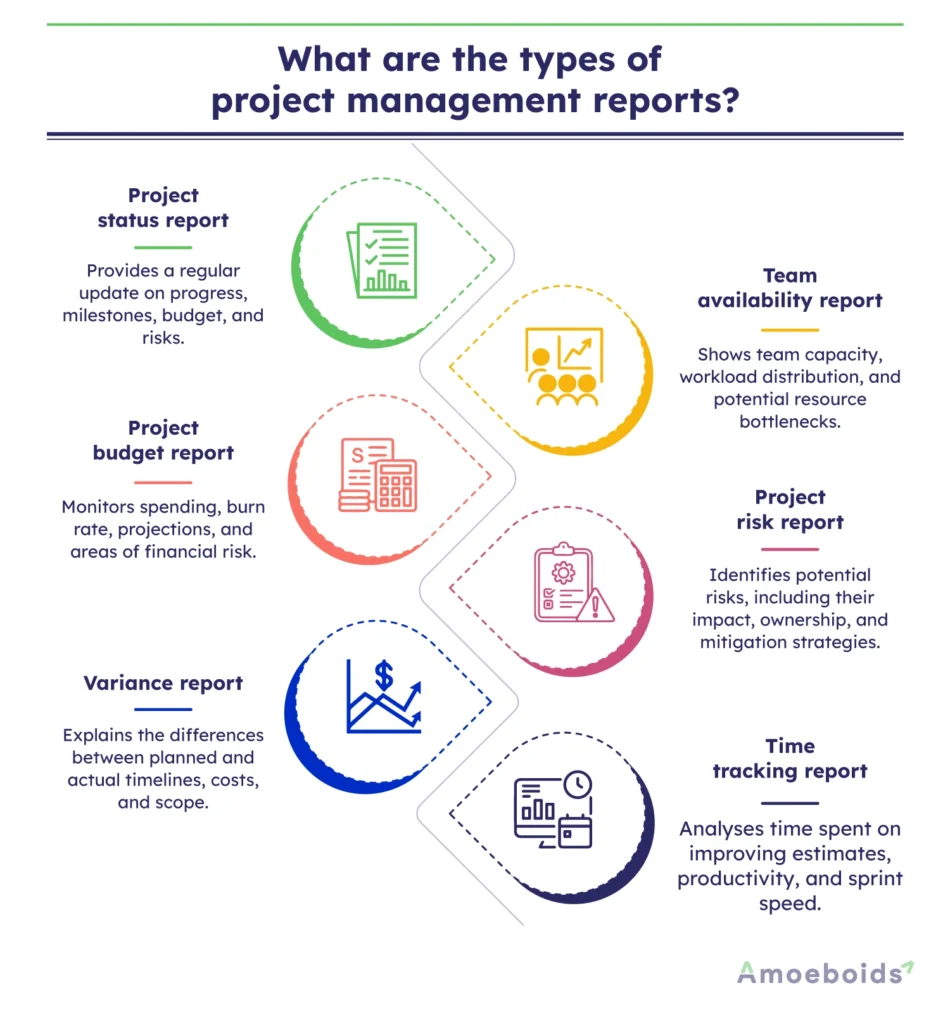
1. Project status report
This is your standard check-in report. It provides a clear picture of the project’s progress at a given point in time. It typically includes:
- Current phase or sprint status
- Completed and pending tasks
- Milestones hit or missed
- Budget standing
- Key risks and blockers
It’s typically shared on a weekly or biweekly basis and helps keep everyone informed without requiring access to raw data. This is one of the most widely used examples of project management reports.
Example Use:
A marketing agency sends a status report every Friday to summarize deliverables, client feedback, and potential delays.
2. Team availability report
Managing capacity in Agile teams is tricky, especially when you’re juggling multiple sprints or epics. This report highlights:
- Who’s working on what
- Who’s under or over capacity
- Resource gaps that might delay work
- Planned vs actual hours
This report is vital for sprint planning and realignment. It prevents burnout and missed deadlines by giving managers a realistic view of the team’s bandwidth. It’s a lesser-known but valuable project management report example.
Example Use:
During a sprint review, the Scrum Master notices two QA engineers are overbooked for the upcoming sprint. The availability report helps redistribute testing tasks more evenly.
3. Project budget report
Even Agile teams need to keep an eye on the numbers. A budget report shows:
- Planned vs actual spend
- Burn rate
- Upcoming cost projections
- Areas of overspend
This report enables decision-makers to assess whether a project remains financially viable and whether any scope adjustments are necessary. It’s a key component in understanding what a project management reports in financial terms.
Example Use:
A SaaS product team realizes that their AWS usage is trending over budget. The report helps flag this early so that they can optimize resources in the next sprint.
4. Project risk report
This report focuses on what could go wrong — and what’s being done about it. It outlines:
- Identified risks and categories (technical, operational, etc.)
- Likelihood and impact
- Mitigation plans
- Risk owners
Example Use:
In a cross-team integration project, the risk report highlighted a dependency on a third-party API with a known history of outages. The team developed a backup workflow to prevent downtime during releases. Risk tracking like this forms part of practical project management report examples.
5. Variance report
This type of report explains gaps between what was planned and what happened. It highlights:
- Schedule variance (planned vs actual timelines)
- Cost variance (budget vs actual spending)
- Scope creep (features or tasks added mid-sprint)
- Root causes and recommendations
Example Use:
A PM running a multi-phase rollout notices that Phase 2 slipped by a week. The variance report revealed an unaccounted client sign-off delay, so they adjusted all downstream timelines accordingly.
6. Time tracking report
More granular than a budget report, this tracks time spent on specific tasks, user stories, or project phases. It helps with:
- Evaluating effort vs estimates
- Understanding time sinks
- Improving velocity in future sprints
- Spotting under- or over-utilization
Example Use:
After two consecutive sprints failed to meet their goals, the team analyzed time-tracking data and discovered that daily stand-ups were encroaching on deep work hours. They adjusted the meeting frequency and regained momentum — a perfect project management report example for Agile retrospectives.
Each type of report serves a specific purpose, and knowing when and how to use them is key to keeping your project on track and your team aligned.
Conclusion: Making your project management report work for you
A strong project management report is the bridge between your work and the rest of your organization. We’ve explored different types of project management reports, answered the question “what is a project management report?”, and shared real-world project management report examples that bring focus and momentum to your projects.
And the format you choose matters. A status report builds trust with clients. A risk report catches problems before they snowball. A variance report helps you course-correct, not just explain delays. The goal isn’t to create reports for the sake of reporting, but to help people move in the right direction with the proper context.
Of course, pulling data together manually isn’t ideal. This is where tools come in handy. But even the best tools won’t help if you don’t know what your report needs to say. Start there. Who’s reading it? What decision do they need to make? What problem are they trying to avoid?
Once you answer that, you’re not just writing a report — you’re helping your project succeed.
Pick one report. Keep it simple. And make it count.
FAQS
Q. What are the 5 W’s of project management?
The 5 W’s — Who, What, When, Where, and Why — help define the scope, ownership, timeline, and objectives of a project. They form the foundation for effective planning and communication across teams.
Q. What is the main purpose of the project report?
A project report keeps stakeholders informed by summarizing progress, risks, and outcomes. It helps teams stay aligned and supports better, faster decision-making.
Q. How many projects should a PM manage at once?
This depends on the complexity and size of the projects. On average, a project manager can handle 2–5 mid-sized projects simultaneously without sacrificing quality or team support.
Q. What are the 7 C’s of project management?
The 7 C’s refer to Clarity, Communication, Commitment, Collaboration, Competence, Creativity, and Continuous Improvement. Together, they drive strong execution and team performance throughout the project lifecycle.