It’s likely that your sprint board is often flooded with new tasks minutes before a demo, which leaves you wondering how you’ll actually deliver on time. That frustration is common, and tackling it is exactly where AI in project management becomes relevant. Many project leads today are painfully aware of the gap between planning and execution: missed deadlines, over-committed sprints, exhausted teams.
According to one recent study, 70% of project managers say implementing AI tools has improved their project outcomes.
That is why more teams are looking into AI and project management practices to improve planning accuracy, reduce delays, and create smarter workflows in Agile environments.
In this blog, you’ll discover what the role of AI in project management looks like, learn about concrete examples of AI in project management, and explore the types of AI tools for project management that you can adopt. Let’s dig in.
Artificial Intelligence in project management
Utilizing AI in project management involves using algorithms and data-driven insights to support tasks such as forecasting, scheduling, risk detection, and resource allocation.
For example, suppose you track sprint velocities and task completion across several teams. In that case, an AI-powered dashboard might highlight that Team B has consistently underestimated backlog items and suggest future user stories accordingly. It doesn’t replace your decision, but it helps you act sooner.
As projects grow in complexity, human intuition alone can falter. AI in this context helps you handle these complexities, spot patterns in data, and give you more time to focus on the human side of projects, such as team collaboration, stakeholder alignment, and value delivery.
Why is AI important for project management?
AI for project management is changing the way teams plan, execute, and deliver work, making workflows smarter, faster, and more predictable.
You can use AI tools to manage timelines, predict risks, and get real-time updates without relying on manual spreadsheets. AI frees you from coordination and allows you to focus on strategy. This helps with resource allocation, workflow, and other tasks.
Companies are increasingly integrating project management with AI to automate coordination, enhance awareness, and accelerate real-time decision-making.
It also improves decision-making with data-driven insights, turning uncertainty into clarity. To sum up, AI takes project management from reactive problem-solving to proactive and high-impact execution.
Benefits of AI in project management
Integrating AI into project management unlocks several benefits:
The growing trend of using AI in project management is helping Agile teams in reducing manual work while increasing sprint reliability and delivery confidence.
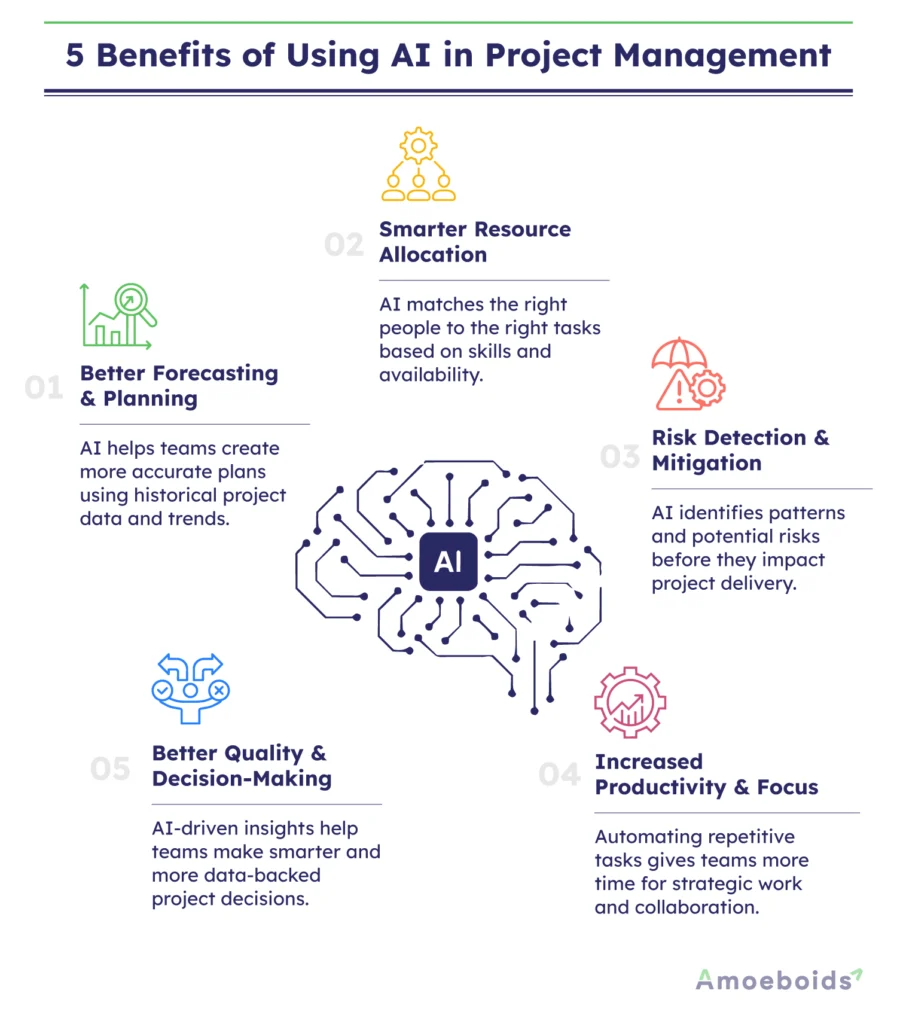
1. Better forecasting and planning
When you have historical data about task sizes, velocity, and blockers, then AI can analyze that and help you make more accurate plans. One source reports that 41% of experts say they’ve seen significant enhancements in project delivery since using AI-based tools.
In practical terms, in your next sprint planning session, you might ask your AI tool, “Given our last five sprints, how many story points can we commit this time?” It’s not magic, but it gives you a benchmark.
2. Smarter resource allocation
The role of AI in project management also includes analyzing workloads, availability, skill sets, and helping assign the right person to the right task. Studies show benefits in resource utilization and scheduling through AI.
Suppose two developers are free, one has backend expertise, the other frontend UI. The AI tool might highlight that the upcoming work is UI heavy and recommend the second person accordingly.
Many companies now rely on AI based project management systems to balance workloads, reduce burnout, and improve team productivity without constant manual intervention.
3. Risk detection and mitigation
Every sprint has risks, such as underestimated tasks, unclear dependencies, and stakeholder delays. AI in project management can help detect anomalies or patterns that historically correlate with trouble.
For example, if your tool sees many user stories blocked for more than 24 hours in the last few sprints, it might flag that as a “risky pattern” and you revise your backlog accordingly.
Many companies now rely on AI based project management systems to balance workloads, reduce burnout, and improve team productivity without constant manual intervention.
4. Increased productivity and focus
Reducing repetitive tasks, like status reporting and manual metric tracking, frees up time for more strategic work. According to one survey, 63% of project managers reported increased productivity and efficiency thanks to AI.
Instead of manually updating a Gantt chart or sprint board, you get an automated summary email each morning: “Three tasks still open past due, two developers at full capacity, recommended next step: shift one task to backlog.”
5. Better quality and decision-making
With more data and analytics at your disposal, the decisions you make around prioritization, backlog refinement, and sprint commitments become more grounded. Even in a recent study 58% of project managers said AI has positively impacted the level of output or ROI in their business.
In short, AI doesn’t remove leadership or judgment, but it gives you more reliable inputs into your decision-making.
Common Use Cases of AI in Project Management
AI in project management isn’t just a trendy term, it’s changing how teams plan smarter, act faster, and deliver projects with confidence and visibility.
AI and project management are changing the way modern teams get work done, quickly and clearly, from predictive analytics to workflow automation.
- Smart Planning: AI uses predictive analytics to improve project scheduling and project timelines. It accurately forecasts workloads, allowing teams to plan better and complete projects faster with fewer bottlenecks.
- Risk Prediction: AI identifies patterns and alerts to potential risks early on. This allows for proactive decision-making, reduces uncertainties, and helps teams avoid costly delays or surprises that can derail a project.
- Task Automation: AI task management tools can take care of repetitive tasks like updates, tracking, and reporting. This saves time, reduces manual errors, and allows teams to focus on high-value work.
- Resource Optimisation: AI looks at how the team is doing and how the work is spread out. Distributing tasks among team members ensures an effective resource allocation, increases productivity, and reduces burnout.
- Progress Tracking: Real-time dashboards provide immediate updates on milestones and deliverables. This increases exposure, allows for faster decisions, and keeps projects on track to meet their goals and timelines.
Types of AI solutions for project management
The landscape of AI in project management can be broken down into several types of solutions — each suited to different stages of your Agile lifecycle. Here are five you should know.
As companies continue adopting project management with AI, smarter tools now improve forecasting, sprint planning, reporting, and capacity optimisation.
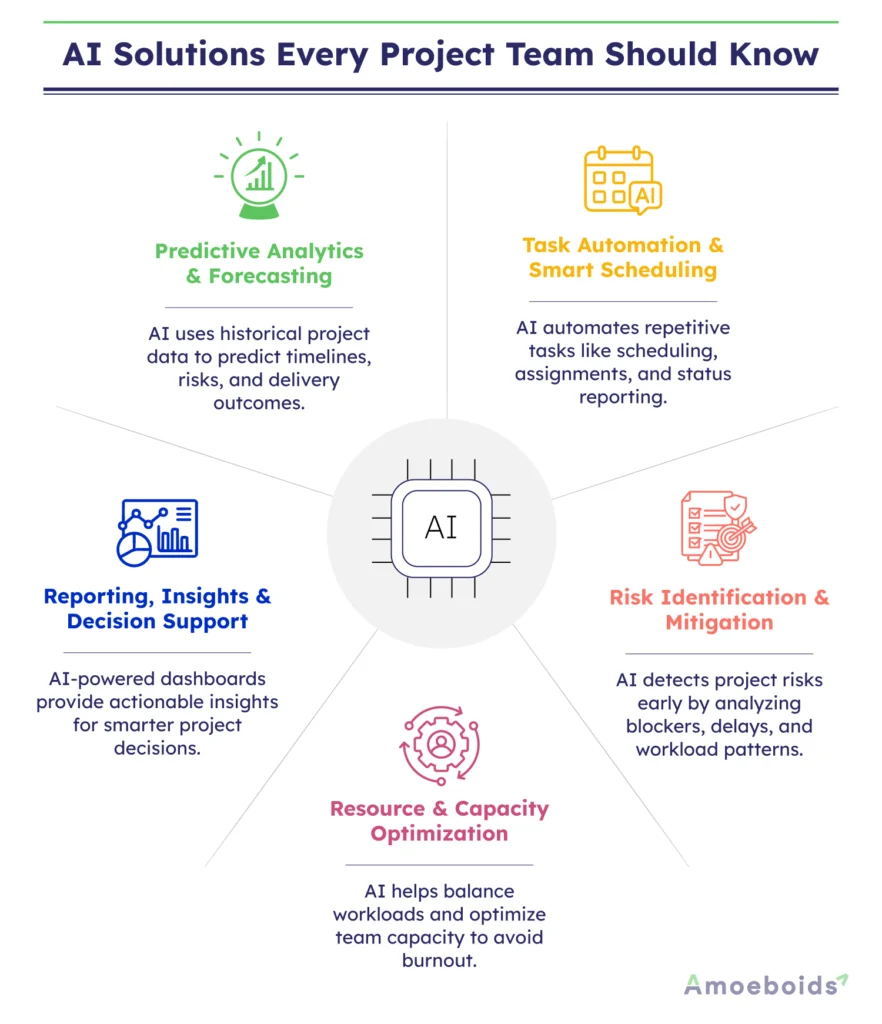
1. Predictive analytics and forecasting tools
These take historical project data and produce forecasts: Will we finish on time? Where are the bottlenecks? This helps you plan epics, set realistic commitments, and adjust when needed.
For example, a tool might show a 75% chance that your current sprint will miss one critical user story, based on previous similar scenarios.
2. Task automation and smart scheduling
Here, the AI automates repetitive and administrative work: assigning tasks to team members, scheduling meetings, generating status reports, and even creating initial project plans. Use case: after backlog grooming, the tool auto-assigns story tasks based on workload and expertise. One source notes automation is a top benefit cited by 33% of project professionals.
3. Risk-identification and mitigation tools
These systems analyze ongoing projects to identify red flags: tasks that stay in “In progress” too long, overlapping dependencies, overloaded resources, or slipping milestones. The benefit: you, as project lead, get early warning and can adjust the sprint backlog or resource mix.
Example: While working on a major product release, the AI flags that three tasks in the sprint “Integration” have not moved for 48 hours and proposes a review.
4. Resource and capacity optimization tools
These tools look at your team’s capacity, skill sets, and upcoming workload, then suggest how to balance tasks, avoid burnout, and make the best use of your people. They can flag when the sum of assigned story points per team member exceeds norms. Implements the concept of “team capacity” in Agile planning.
Example: Before the sprint starts, the tool might pop up, “Developer X is at 120% of his average load — consider moving 2 user stories to backlog.”
5. Reporting, insights and decision support tools
These tools support your strategic view: dashboards that combine metrics across epics, portfolios, and teams to help you answer questions like, “Are we aligned with the product roadmap?” Which features are costing more than planned? What patterns are emerging across sprints and releases? They might integrate with BI tools or generate natural-language summaries of project health.
For example: After release, you review the AI-generated executive summary, “In the past four sprints, average cycle time increased by 12%, due to increased rework. Recommendation: Review the completion conditions and conduct more story refinement sessions.”
Artificial Intelligence tools for project management
If you’re exploring AI tools for project management, here are some widely used platforms that might prove helpful:
Automated Release Notes (ARN) and Reports App for Jira by Amoeboids
Automated Release Notes and Reports App from Amoeboids automates the generation and distribution of release notes and reports for teams working in Jira. It supports multiple formats and channels, and allows custom templates and variables to tailor output for different stakeholders.
In an Agile context, you often finish a sprint or release with many user stories, bug fixes, and enhancements. Manually compiling the list, formatting it for stakeholders, and sending it out takes hours. ARN automates that step. You define the templates once, hook them into your Jira workflows, and every time a release happens, you get a polished document ready.
It’s especially useful when you have multiple teams or releases and need consistent communication with diverse audiences (e.g., developers, execs, customers).
Asana
It’s a work management platform that now incorporates AI-driven goal-setting and project-creation suggestions. It can automatically generate tasks from high-level goals and adjust assignments based on priority shifts.
ClickUp
Designed for flexible team workflows, it offers AI suggestions for task descriptions and priority ranking, and even automates recurring tasks. It can recommend subtasks or trigger custom workflows, thereby reducing manual setup.
Wrike
Known for strong analytics and risk-prediction features, Wrike’s AI module monitors project metrics to alert you to potential delays. In an Agile setting, this means you might get an early warning that a story is at risk of slipping before the sprint ends.
How to Implement AI in Project Management?
You don’t have to take giant leaps to start using AI for project management. Simply take small and smart steps to increase confidence, clarity, and measurable impact.
The process of using AI in project management becomes more effective when teams start with small use cases and steadily scale automation across workflows.
- Start with Use Cases: Identify areas where AI can add value, such as risk management, workflow automation, or predictive analytics. Focus on high-impact areas to achieve quick outcomes.
- Choose the Right Tools: Explore AI project management tools that suit your workflow. Look for features such as real-time insights, intelligent scheduling, and seamless integrations.
- Prepare Your Data: Clean and structured data is required for accurate insights. Make sure your sources are credible, current, and relevant to your project.
- Train Your Team: Upskill your team in AI concepts, tools, and methods. Gain confidence through hands-on training and cross-functional collaboration with data experts.
- Start Small and Scale: Begin with pilot projects or limited use cases. Test outcomes, learn quickly, and gradually expand AI adoption across teams.
- Measure and Optimise: Track important KPIs such as productivity, delivery speed, and resource usage. Use data-driven insights to continuously refine and improve your AI-powered workflows.
Best practices for the Al project management
Implementing a set of regular practices and procedures can help your organization leverage the benefits of AI tools for project management. Successful adoption of AI based project management depends on balancing automation with human judgment, collaboration, and continuous sprint improvements.
Start with good data
AI tools can only work well when your project data is accurate and consistent. Keep your backlog, sprint logs, and issue updates clean so the system can read real patterns.
Decide what you want the tool to answer
Go in with clear goals like “Can we finish this sprint on time?” or “Who is overworked this week?” It helps the tool deliver useful insights instead of random numbers.
Let the tool fit your workflow
If you follow Agile practices, connect the tool to your sprints, retrospectives, and daily stand-ups. Don’t make your team change how they already work.
Use small experiments
Try one project or one sprint first. Review the results. If it helps, expand slowly across teams.
Train your team
People should know what the tool can and cannot do. Teach them how to read AI-based reports and use them for better planning.
Keep the human touch
AI can predict risks or delays, but decisions should still come from you and your team. Trust data, but rely on your judgment too.
Measure what matters
Track metrics like sprint accuracy, reduced delays, or fewer missed deadlines. This shows whether the tool adds real value.
Review and improve often
After every few sprints, look at what the tool got right or wrong. Update your data and feedback to make it smarter.
Watch the return on investment
If your productivity, delivery time, or quality doesn’t improve after a few months, adjust how you use the tool or switch to another one.
Conclusion: Leverage AI in project management to boost productivity
AI in project management is about enhancing your toolkit so you can lead with more confidence, less rework, and clearer insight. As you’ve seen, the benefits range from better forecasting and resource allocation to risk management and increased productivity.
Start with your next sprint: Bring in one of the tools, ask a focused question (for example: “Can we commit 40 story points this sprint based on our last five?”), and treat the output as input, not an answer. Iterate every sprint.
With stronger sprint goals, fewer unexpected roadblocks, and more time to focus on meaningful work, your team can finally move with purpose. Start small, keep learning, and let real results guide your next steps.
FAQS
Q. How do you implement AI in project management?
Start by identifying what problems you want to solve, such as missed deadlines or uneven workloads. Choose an AI tool for project management that integrates with your current workflow, like Jira or Asana. Begin small — use it for one sprint or one project — and expand once you see results. Keep your data clean, train your team, and review the insights regularly to make smarter decisions.
Q. What are some common challenges with AI in project management?
The biggest challenge is poor data quality. If your backlog or sprint updates aren’t consistent, the insights will be unreliable. Some teams also struggle with over-reliance on tools, expecting AI to make decisions for them. Others face resistance from team members who don’t fully trust automation. The solution is to use AI as a guide, not a replacement, and keep communication open across the team.
Q. What is the role of a project manager in Al?
Even with automation, the project manager remains the bridge between data and people. Your role is to interpret the AI’s insights, apply human judgment, and ensure the team stays focused on goals that matter. You decide when to act on a prediction, when to dig deeper, and how to balance efficiency with creativity. In short, AI handles the numbers, and you handle the direction.