It’s a typical morning, and you’re ready to tackle your tasks. You start by reviewing your plans for the day, having a quick chat with your team to align on priorities, and organizing your workflow to keep things running smoothly. As the day unfolds, you gather user feedback, analyze data to track progress and adjust strategies as needed.
It sounds like a lot to juggle, right? That’s where product management tools come in.
These tools simplify your day, keep your team aligned, and help you make informed decisions.
But let’s be honest—choosing the right tool can feel overwhelming with many options.
This quick guide will explain the main types of product management tools and techniques and help you choose the perfect one for your needs. Let’s simplify the process!
Why do product managers need specialized tools?
When creating an app, a website, or any other big idea, you must have an appropriate set of tools. This allows for proper coordination and tracking of project tasks. Otherwise, your team is reduced to making sketches on rough paper, looking for fellow workmates for updates, and fighting over unorganized Excel sheets.
No bueno.
Nearly 30,000 new products are launched in the market every year. Companies that adopt SaaS solutions boost their product market growth by up to 40%.
Here’s how specialized tools can save the day for you as a product manager:
- You can streamline workflows by automating routine tasks and focusing on any project blockers.
- You can boost collaboration by uniting your team with clear communication and shared goals.
- You get real-time insights at your fingertips to make data-driven decisions.
- You efficiently manage tasks and priorities, even in chaotic moments.
Numerous solutions are available in the market, but what is the right choice for you varies from case to case. You can find the best product management tool by comparing solutions according to your use case category.
Categories of product management tools
Product management is no one-size-fits-all job. Just as you wouldn’t use a hammer to screw in a nail, you need the right tools for specific challenges. Let’s break down five main types of tools that product manager needs and how they help:
Roadmapping and planning tools
These tools are useful for defining and sharing your product vision with your team. Interestingly, you can align your team goals, track progress, streamline plan communication, and adapt to any changes based on feedback.
Examples: Aha!, ProductPlan, and Amoeboids Product Roadmap tool. They are perfect for outlining strategies and aligning your team’s goals.
Collaboration and communication tools
Use a team collaboration solution to keep your team in sync and avoid email overload. Such tools can help you engage with your team in real time–no endless meetings required.
Examples: Slack and Miro are two popular tools for this purpose.
Task and project management tools
These tools are best for managing sprints, tracking deadlines, and overseeing workflows from a unified dashboard. Whether coordinating team tasks or managing complex projects, you can check whether everyone is on the same page.
Examples: Tools like Jira and Asana can be used to keep your sprints, deadlines, and workflows in check.
Customer feedback and research tools
Product management always focuses on building your users’ needs, not just what you think they want. Fortunately, there are tools to help you achieve this clarity. Tools like UserVoice and Typeform capture insights straight from the source. You can gather direct feedback and research easily to ensure your decisions are rooted in real customer needs.
Analytics and reporting tools
If you want to build sustainable products, your product management strategy must be flexible to welcome changes based on user feedback and product performance.
Tools like Mixpanel and Amplitude allow you to analyze user behavior and make informed choices based on performance analytics. These insights assist the team in making decisions that aid in growth and success.
So, these tools are useful for product management. But still, the question remains: how do you choose the right solution from the vast array of solutions available in the market?
How to pick the best product management tool
It’s not about choosing the shiniest product management software on the shelf. Rather, it’s about solving specific challenges and streamlining your workflow. Here’s a breakdown of how to make the best choice:
Step 1: What problem are you solving?
Begin by identifying the gap in your current toolkit.
For example, if your team struggles to align on a product vision, a road mapping tool like Aha! might be the answer. Define the specific features and functionality you need to address.
Step 2: Who will use it?
Determine how many licenses or seats you’ll need and who will be involved.
For instance, if your development and marketing teams need access, ease of use and scalability should be high on your checklist.
Step 3: Integration matters
Evaluate how well the new tool will fit with your existing stack.
For example, if you rely on Slack for communication, ensure your tool integrates seamlessly for streamlined updates and notifications.
Step 4: Desired outcomes
Clarify what success looks like. Is it better visibility into your sprints, improved team collaboration, or faster decision-making?
Keeping these goals in mind will help you evaluate potential tools effectively.
Step 5: How will it work within your organization?
Analyze your workflows and methodology. If you’re running agile sprints, tools like Jira may align better. Remember, every organization is different—popularity doesn’t always mean compatibility.
Choosing a tool is like picking the perfect recipe: the right ingredients make all the difference. Next, let’s explore the top 20 tools to supercharge your product management game!
20 Product Management Tools Comparison
| Tool | Key Feature | Pricing |
|---|---|---|
| Google Sheets | Robust collaboration ability and near-instant saving of changes | Free |
| Field | Provides list of questions based on different frameworks to create a questionnaire | Fireld starter plan starts from €129/month per seat |
| Confluence | Natively integrate into Jira tasks to convert text into an actionable item | Start for free |
| Notion | Creates templates out of existing notes to maintain different types of notes | Start for free |
| Slack | Private instant messaging, channels and group chats to audio notes | Start for free |
| Miro | Provides virtual whiteboard for creating tables, flowcharts, mind maps and more. | Start for free |
| Figma | Puts all the design files in one place letting editors lock, release commenting and edit | Start for free |
| Pitch | Create branded slide decks in minutes and collaboratively to boot | Start for free |
| Typeform | Focuses on conversation-style surveys where they show one question at a time | Start for 25$/month |
| Google Docs | Link information from other apps like drive, calendar or video to a Docs file | Free |
| UXCam | Identifies where customers are dropping off, uncover user frustrations and prioritize features | Start for free |
| Embedder for Confluence | Shows patterns around user searches & identifies most searched terms & their frequencies | Start for free |
| FullStory | Capture processes, product analytics reports and other functionalities to make improvements | Get Demo |
| Pendo | Creates custom guides for smoother onboarding, capturing feature requests and prioritizing them. | Start for free |
| Split | Flexibility for testing, running of A/B tests and provides a hassle-free way to retire features | Start for free |
| Screenjar | Create unique links from which customers can record & upload videos without any installation | Start for free |
| Automated Release Notes | Reduces tedious stuff and brings in efficiency with the power of automation for release notes | Start for free |
| Grammarly | Integrates with most tools and gives suggestions right there, withouth opening another window | Start for free |
| Trello | Builds templates that anybody can use and adapt as per their needs. | Start for free |
| Roadmap Portal for Jira service management | Prevents repetitive & duplicate requests from the customers to build a roadmap out of what already exists | Start for free |
20 Best Tools for Product Management
Here, we are listing out 20 product management tools to help product managers become more efficient & effective in discharging their responsibilities. These tools are divided into following categories (note that these are fluid, meaning a tool can belong to one or more categories):
- Project and task management
- Collaboration and productivity
- Design and wireframing
- Customer feedback and surveys
- Analytics
- User experience testing
- Product strategy and roadmapping
Like we said earlier, these tools are not exclusively for product managers. But they do play an important part in their contributions.
Project and task management

From understanding the customer needs to rolling out the final product, there are plenty of tasks for product managers to execute – and this section of tools can take care of many of those.
1. Google Sheets

Any spreadsheet is a good starting point for product managers, as the simple number manipulations and filtering mechanisms facilitate quick overview and analysis. The advantage that google sheets provide over others is its robust collaboration ability and near-instant saving of changes – version histories can also provide a makeshift way of tracking progress. The collaboration limit of 100 can be a dampener for managers looking after multiple products and interacting with several groups. The cost is on the lower side, too, with essential organization and analysis being free for regular users, while monthly plans for businesses and individuals offer additional value.
2. Field

Field uses ‘Collect, Explore, Present’ to sort out the lives of product managers. The collection part handles information gathering through feedback, stakeholder interaction, and others. Being one of the better tools for product managers, it provides them with a list of questions based on different frameworks and allows them to create a questionnaire. It also allows product managers to explore data through other maps that rate products on various aspects. Once set, product managers can specify narratives for different audiences and use them accordingly.
3. Confluence

Confluence helps product managers store documentation so developers can use them to find ideas and solutions. It also allows for prioritizing and provides templates such as product requirements documents (PRD), meeting notes, quick start guides, and more. Its ability to natively integrate into Jira means product managers can use feedback sessions and issues to create Jira tasks, convert text into an actionable item by highlighting it, etc.
Collaboration and productivity

A product manager’s duties involve interacting with different stakeholders. From idea generation to issue identification, these interactions can vary and require varying degrees of collaboration. The tools below unlock barriers to communication and make the process more productive.
4. Notion

For a note-taking tool, Notion packs in a lot of punch. Product managers can use it to take notes in meetings, organize and label them, and search for what they need with just a few taps/clicks. It also offers different types of messages and provides helpful suggestions on organizing and using them. Adding drop-down menu items, tag notes, and people, managing notes/pages into parent/child structure, and creating templates out of existing notes enables product managers to maintain different types of notes and collaborate with other team members. Notion also lets product managers work with checklists, set deadlines, create product wiki for various information, and more.
5. Slack

Slack keeps communication going in the organization and helps coordinate the daily operations of product managers. From private instant messaging, channels, and group chats to audio notes, slack provides a lot of necessities that a good project manager needs. Slack can help you showcase work, demo products, and in other activities like file sharing and workflow automation.
Design and wireframing

These tools are not made with product management activities in mind – yet they provide enough and more ways for product managers to iron out the wrinkles in the process.
6. Miro

Miro is a virtual whiteboard for product managers and lets them work strategically by enabling them to create tables, flowcharts, mind maps, and more. Miro templates cover many product-related activities, like opportunity solution trees, design sprints, retrospective templates, project canvas, etc.
7. Figma

Figma exploded at the beginning of 2020 because of its nifty collaboration abilities and how it opened up prototyping for everyone. Its comment feature and single link shareability make mockup iterations much faster. Figma frees up version control of design files by putting all of them in one place and letting editors lock and release commenting and editing. It simplifies user interaction testing and design presentations to stakeholders and allows product managers to embed live files into tools for product management like Notion, Jira, and Confluence.
8. Pitch

Pitch has a simple pitch: it wants to help teams create better presentations. Pitch helps create product release notes, vision, strategic documents, roadmaps, etc. Product managers rein in multiple teams and guide their efforts in one direction. Product managers can create branded slide decks in minutes and collaboratively to boot. It also integrates natively with stock-image platforms and Google suite (Analytics and Sheets).
Customer feedback and surveys

Without customer input, the survival of product is in jeopardy (no input can also be an input, but that is a different matter altogether). These tools help get those valuable words out so that the product team can improve based on customer needs.
9. Typeform

With ‘human’ focused interactions, Typeform makes feedback extremely easy for product managers and product users. This form builder focuses on conversation-style surveys where they are shown one question at a time, which leads to high completion rates and, more importantly, thoughtful responses. The template library of Typeform is quite extensive and features a dedicated product category.
10. Google Docs

The @ tag ‘intelligent chips’ feature of google docs helps product managers to link information from other apps like drive, calendar, or video to a Docs file. Apart from people, meetings and checklists can be tagged too. It works well for text-heavy documents and provides a no-frills way to create documents that can be edited in real-time.
Analytics

Customers’ data is a valuable source of insights and suggestions, but only if the vendor organization has the right analytics processes. These tools ensure the bases are covered, so the data can be used to generate action items for the product team.
11. UXCam
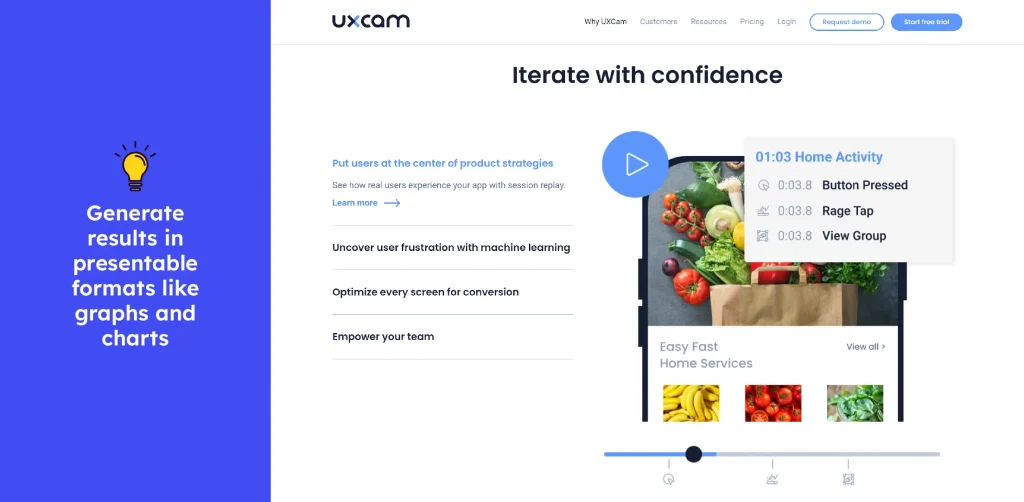
The UXCam is one of the user experience analytics tools for product managers that helps them identify where customers are dropping off, uncover user frustrations, and prioritize features and issues. Its app analytics indicate if user experience, feature prioritization, conversion tracking, and other activities are running smoothly and aim to provide an understanding of conversions. It pinpoints reasons, validates A/B tests, and gives product managers control of the narrative.
12. Embedder for Confluence

While not an analytics tool, Embedder makes Confluence documentation easily accessible for customers. More importantly, from analytics point of view – it shows patterns around user searches & identifies most searched terms & their frequencies. This helps product managers fine tune the support documentation/knowledge base and fix UX issues. Product managers can insert widgets and access Confluence content anywhere across the web with the Embedder app. The tool can integrate with any web or mobile app via a widget, be it floating, pop-up or inline.
13. FullStory

FullStory captures and analyses both quantitative and qualitative data and helps you improve the product experience for users. Its secure data capture processes, comprehensive product analytics reports, and other functionalities let product managers make improvements as and when necessary. Its open API has resulted in a growing catalog of integrations that connects to additional tools and provides a comprehensive data picture.
User experience testing

User experience decides the success or failure of a software product, and product managers can identify weak points with the help of these tools. They help understand user needs, get their opinion and other related information, and more.
14. Pendo

Pendo is a product adoption platform that combines analytics and feedback management. It adopts a data-driven approach that is also user-centric and provides tools for product management like roadmapping. Product teams can utilize the results of surveys and user research to improve overall customer experience by creating custom guides for smoother onboarding or capturing feature requests and prioritizing them.
15. Split

Split is a product management tool that enables feature flagging and makes it easy to take feedback. It allows more flexibility and agility in testing, simplifies the running of A/B tests, and provides a hassle-free way to retire features that perform below expectations. From calculating the impact of features released based on assigned metrics and goals to simplifying testing by creating experiments for every feature built, it helps product managers rapidly prototype and test their hypotheses.
16. Screenjar

Screenjar lets product managers create unique links for customers, from which they can record & upload videos of their screens without any installation. With minimal clicks, the customer can share their insights/complains & help product managers see from the customer’s point of view. Screenjar has deeper integrations with popular helpdesk and live chat solutions. It makes the error reporting process frictionless and can be used by even non-tech-savvy customers.
User onboarding/communication

Customer communication should be a key focus area, especially when the customer is new to your product. Helping customers get started should be a seamless process. These tools allow product managers to create (or use existing) touch points in various user journeys – from ensuring friendly language to simplifying the feedback process.
17. Automated Release Notes

Release notes are an untapped exercise for customer & stakeholder communication. With targeted & valuable content, you can increase engagement with your product. Automated release notes for Jira take away the tedious, manual stuff and bring in efficiency with the power of automation. To trigger the generation of release notes, rules can be set – so that relevant people or groups of people get the information they need in a way they can quickly digest. Be it an email to the higher-ups, a pdf for client review, or an email chain among colleagues – ARN can generate reports based on any rule set. Even webhooks are available for integration with the DevOps tool chain.
18. Grammarly

Grammarly is not a product manager-specific tool per se – but it does alleviate constant worries of writing the wrong thing in your communication. It integrates with most writing tools and gives suggestions right there – no need to go to another app or a browser window to check if the language is correct. The tips on correctness and writing style are the app’s upgrades, along with the usual grammar and spelling.
Product strategy and roadmapping

Communicating the product direction with stakeholders & gathering their feedback is one of the high stakes activities product managers are involved in. These tools help product managers create visual presentation of product roadmaps & make them a hub for customer & other stakeholder interaction.
19. Trello

Teams that have a need for basic product roadmapping tool, almost always rely on Trello. Because it brings a lot more than colors to a product manager’s screen. With Kanban like presentation, creating a product roadmap & sharing it with the world is a cakewalk for product managers. It also has a thriving community that builds templates, and anybody can use them and adapt them as per their needs.
20. Roadmap Portal for Jira service management

Roadmap portal allows product managers to create a compelling product roadmap on top of their Jira Service Management. It helps prevent the repetitive & duplicate requests coming in from the customers by building a roadmap out of what already exists in the service project. Roadmaps can be set to be accessed different variations such as public, private, and restricted – all this, while keeping all your data within the Jira service management. Roadmap Portal uses JQL & thus allows for automation of the entire product roadmap activities.
Benefits of using the right product management tools
Once you’ve nailed your tool stack, the benefits roll in faster than your sprint deadlines. Here’s why choosing the right tools is a game-changer:
Save time
A product management automation solution can streamline workflows, which means less time on admin and more time on strategy. For example, it takes a lot of time to curate release notes and collaborate with the team to get feedback and incorporate it.
Boost alignment
Keep everyone rowing in the same direction. Product management tools help us stay on the same page by centralizing communication and aligning everyone with shared goals. These tools will avoid confusion and keep your team focused.
Prioritize effectively
Focus on what matters most. The right tools really help your team stay focused on what matters most. They let you align priorities with real-time data so that you are not just guessing but making decisions that count.
Data-Driven decisions
You no longer rely on gut feelings. Rather, you start making data-driven decisions. You shape your product strategy based on actual insights, not assumptions.
The right product management tool doesn’t just make life easier—it transforms how you manage, plan, and execute. The benefits are undeniable, from saving time to driving data-backed decisions.
So, as you gear up to optimize your product management process, remember that a well-chosen tool is like a well-oiled machine—it keeps everything running smoothly.
Conclusion
Product managers and teams usually utilize what is available for various tasks (spreadsheets, presentation software, note-taking tools), not just because of a lack of budget but also because of a lack of understanding. Sometimes, the learning curve is deemed too steep even without trying out the tool, and it might not be done consciously either – the existing workload limits what teams and managers can accomplish. By actively adopting tools and processes that fit in their workflow, organizations can support the growth of their product teams and foster a culture of learning and constant improvement.
FAQs
What are some must-have tools for a product manager?
Start with basic road mapping tools such as Aha! to strategize and a collaboration tool, like Slack, for communication. Meanwhile, leverage Mixpanel to track user insights from its analytics dashboard.
What is the appropriate tool to use for your team?
Consider what your team needs most—better communication, streamlined workflows, or data insights. Then factor in your budget and whether the tool integrates smoothly with what you already use.
Are there free tools available for product management?
Absolutely! Tools like Jira for task management, Miro for brainstorming, and Google Analytics for tracking metrics offer free plans to get you started.
What’s the difference between road mapping and task management tools?
Road mapping tools help you see where you’re heading with your current product development strategy. Meanwhile, task management tools help you stay on top of your daily to-dos and execution.