The Chaos of the Modern Release: When One Launch Means Multiple Jira Projects
Imagine shipping a major platform update where the actual development work lives in completely separate Jira projects: one for mobile, one for the web, and another for the backend API. When all three teams ship their updates simultaneously, it looks like a single “Version 3.2” release to the outside world.
But internally, it’s fragmented.
The hard truth is that leadership and stakeholders do not care that your data is housed in three different projects. They only have one question: “What exactly did we release?”.
This disconnect is where traditional Jira release management communication begins to break down. Managing this structure at a small scale might be relatively simple, but as you grow, tracking updates across multiple projects quickly descends into total chaos.
The Burnout Trap: Why Manual Cross-Project Release Notes Don’t Scale
To answer that simple question of “what did we release,” most teams resort to a painfully manual workflow.
Jira updates are typically exported into rigid Excel spreadsheets, where release managers spend hours copying, pasting, and manually formatting the data. Because customers don’t care about highly technical details, you are often forced to chase down developers on Slack or MS Teams to translate their ticket data into simple summaries.
This manual cycle is a massive trap. Every time you rely on manual data entry, there is a high chance of human error, meaning someone always misses a crucial ticket. As a result, your reports end up late, inconsistent in tone, and highly unreliable. Instead of investing time into actual release work, hours are wasted just creating reports and doing rework. Ultimately, stakeholders lose trust, and teams face intense burnout during every single launch due to this unsustainable manual work.
The Solution: Automated Release Notes and Reports (ARNR)
What if you could automate Jira release notes so they are structured, centralized, and generated in minutes? This is where the Automated Release Notes and Reports (ARNR) app steps in.
ARNR bridges the gap between your fragmented Jira projects and the unified stories your stakeholders desperately need. By implementing one-click reporting, the ARNR Jira app transforms a chaotic, repetitive reporting process into a reliable, automated system, eliminating the manual copy-pasting that slows your team down.
Building Your Unified Story: Templates, JQL, and Automation Rules
ARNR makes automated reporting Jira workflows effortless by breaking the process down into three powerful components:
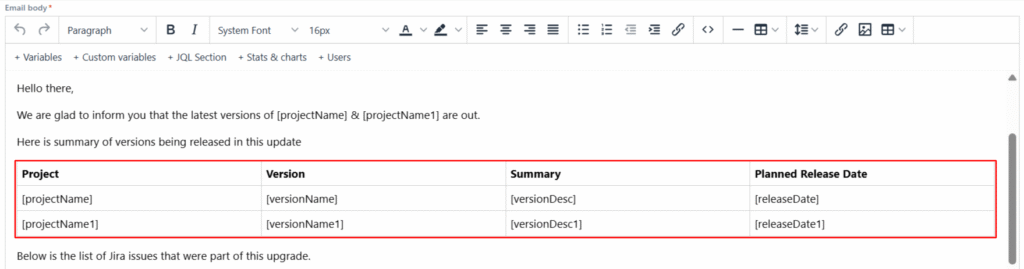
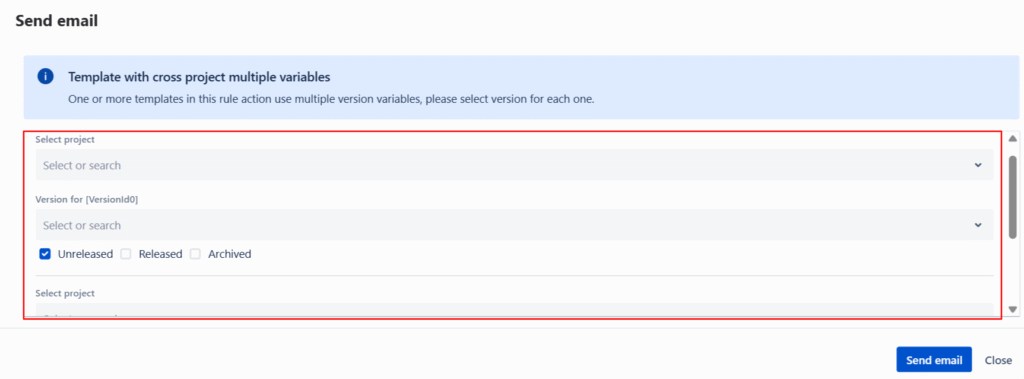
- Reusable Templates: You never have to build a report from scratch every time. You can create custom templates for PDFs, emails, Confluence pages, Word docs, and even Slack or MS Teams announcements. ARNR uses specialized variables that dynamically pull in specific project names, version names, and dates, adapting perfectly whether you’re reporting on one version or pulling data from multiple projects simultaneously.
- JQL Power & Flexible Formatting: Every piece of data in ARNR is fetched using standard Jira Query Language (JQL). This means you can easily pull specific issue types, assignees, or even calculate numeric aggregates (like the sum of story points) across multiple projects at once. Once the data is fetched, you can display it using highly customizable table, sequential, or grid layouts.
- Automation Rules: Automation is what truly ties the system together. Once your template is set, you simply create a rule. A single rule can execute multiple actions simultaneously – such as emailing a PDF attachment to stakeholders, publishing an internal Confluence page, and pinging your Slack channel to notify the team. With just one click, your entire distribution workflow is completed instantly without having to manually trigger each action.
Beyond Standard Releases: Real-World Cross-Project Use Cases
The true power of ARNR extends well beyond standard releases. For instance, you can generate Version Workload reports that detail exactly which team members worked on specific stories and bugs across different Jira projects. Teams can also automate ITSM Weekly Major Incident reports spanning multiple services.
You can even tailor reports for specific clients. By using JQL, you can pull issues from multiple projects that all share a specific customer’s label, compiling them into one clean, client-facing document. Additionally, customer success teams can leverage cross-project bug reports to track which projects have the most bugs or customer requests over the last 30 days.
Conclusion: Stop Copy-Pasting and Start Automating
Software releases are complex enough; you shouldn’t let manual reporting drag your team down into burnout. It is time to stop copy-pasting and start building cross-project release notes Jira users and stakeholders will actually read.
Reclaim those wasted hours by giving ARNR a try. A free version of the ARNR app is available that includes all premium features (limited to executing five rules per month), making it completely risk-free to test out these powerful automated workflows for your organization.