The Growing Need for Localized Release Notes
Picture this: you’re a product manager about to launch a major feature, and because your clients are scattered all over the world, maintaining your release notes in multiple languages isn’t optional – it’s a necessity.
The product is ready, but now you face a notoriously tedious job. Manually translating every single piece of Jira content into Spanish, Dutch, German, and French etc and then trying to compile those notes is a massive bottleneck.
But what if you could ditch the manual copy-pasting entirely?
Enter the Automated Release Notes and Reports (ARNR) app for Jira – a tool designed to take this chaotic localization process and put it on autopilot.
ARNR vs. Jira Native Automation: The Power of Prompt Control
If you’ve dabbled in Jira’s native automation, you might wonder why you need an external app. The key differentiator is that ARNR gives you absolute, granular control over how your content is translated.
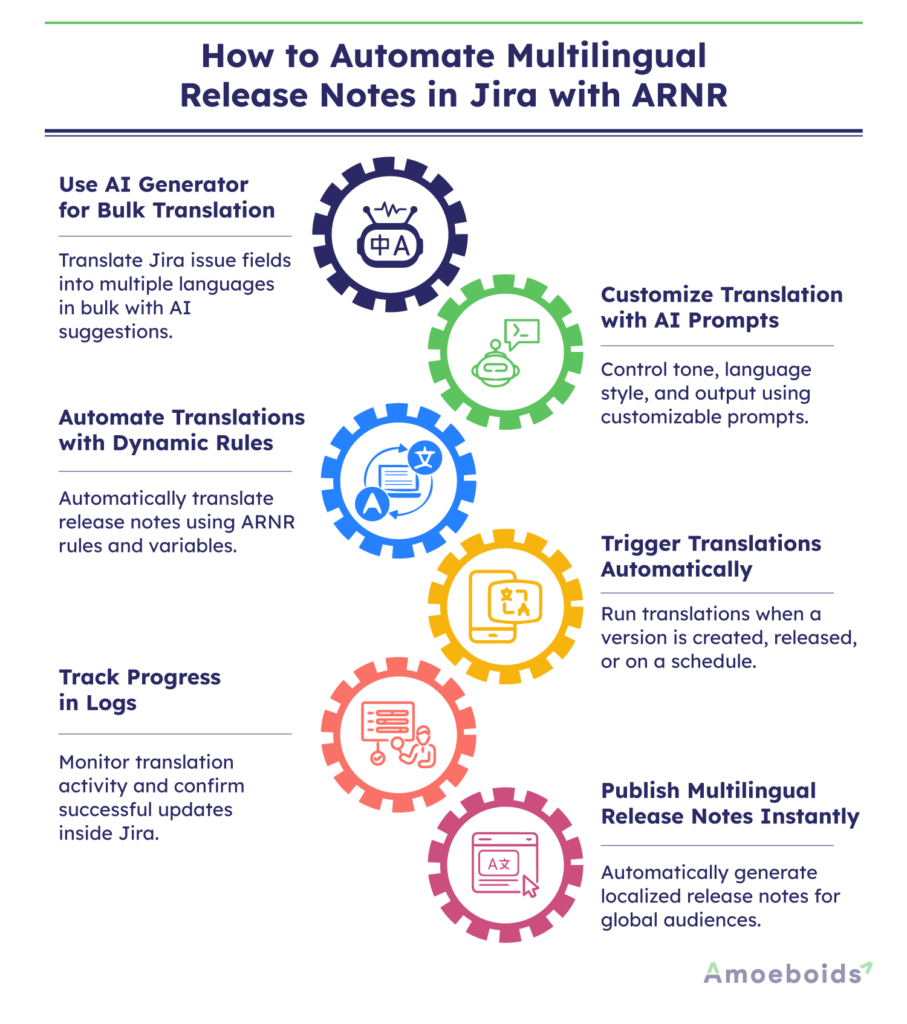
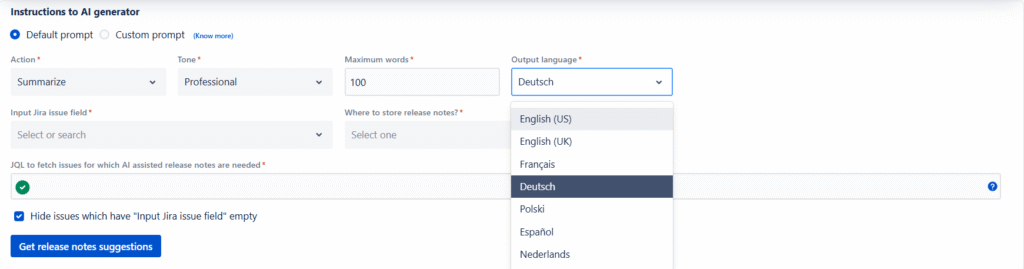
Instead of settling for a robotic 1:1 translation, ARNR lets you use custom prompts to dictate the AI’s behavior. You can explicitly instruct it to “translate the content into German language use a formal tone and keep the original meaning and intent same”. Even if you don’t write a custom prompt, the app’s default settings let you effortlessly tweak the exact action, tone, word count, and target language to match your brand’s voice.
There are two ways to set up this Release Notes translation using ARNR.
Method 1 – The Stepping Stone: Bulk Translation via AI Generator
Let’s look at your first line of defense against manual work: ARNR’s AI generator. Think of this as a highly efficient bulk-processing tool for times when you still want a hands-on approach.
The workflow is simple: you select your input field (like the standard “Description”) and map it to a new output field (like “Description German” or “Description Spanish”). By plugging in a hardcoded JQL query, you fetch the exact batch of issues you need translated.
But ARNR doesn’t just blindly overwrite your data. It generates suggestions that you can review first. You have the freedom to modify the AI’s output, keep whatever was already in the field, or accept the new translation as-is. Once you approve the choices, you hit update, and all your Jira issues are updated in bulk directly within Jira – no external translation tools required.
Method 2 – The Holy Grail: Dynamic AI Rules
The AI generator is a massive time-saver, but it still requires you to manually click through the process. What if you want your translations to happen entirely behind the scenes? That’s where ARNR Rules come in.
The magic of using a rule is that you no longer rely on a hardcoded JQL query; instead, you use dynamic ARNR variables that automatically adapt to your project name or fix version. By setting up an “AI translator” rule paired with a “generate release notes using AI” action, you can instruct the system to translate your descriptions into multiple languages – like French and Dutch -simultaneously. You completely eliminate the need to process each language one after another.

Putting it on Autopilot: Triggers & Full Automation
To make the process completely hands-off, you can attach specific triggers to your rules so you never have to think about translations again. For instance, ARNR can automatically run your translation rule the moment a “version created” or “version released” event occurs in Jira. Or even on a pre-set schedule of your choice.
Tracking Progress with Confidence
Handing over the reins to AI can feel daunting, but monitoring the process is straightforward. Whether your rule triggers automatically or you run it manually for a specific version, you can watch it unfold in the logs tab.
Because the system takes a little time to execute the translation actions one after another, you can just grab a coffee while it works. Once the log reads “success,” simply refresh the Jira issue page in your browser. You’ll see that all your newly localized descriptions have populated perfectly on their own.
Conclusion
Going global shouldn’t mean drowning in translation tasks. By leveraging ARNR’s automated rules, you completely remove the need to manually update issues one after another for different languages. It transforms a chaotic, multi-tool chore into a smooth, native workflow, giving you back the time you need to actually focus on building great products.