
Imagine launching a new product feature, but customer engagement drops after a few weeks. Only then do you notice scattered complaints and realize the feature didn’t work as expected. That gap between what customers feel and what you know is exactly what a customer feedback management tool is built to address.
These tools collect, organize and understand customer feedback from different channels, such as surveys, reviews, emails and more. You get real-time insights about your product/service performance that are structured and ready to act on — no guesswork. Before you get started, you must know whether to target quantitative or qualitative customer feedback and how to analyze it through an ideal customer management tool. Most importantly, you should learn how to overcome associated challenges to guide smarter decisions and deeper customer relationships.
In this article, we’ll explore why a customer feedback management tool matters and how to use it effectively for data-driven insights and long-term customer retention.
Understanding the importance of a customer feedback management tool
Managing customer feedback manually can quickly become overwhelming. Important insights get buried in emails, spreadsheets or chat threads, making it hard to act promptly or meaningfully. Over time, this can lead to missed opportunities, unresolved issues and frustrated customers.
On the other hand, companies that actively collect and manage customer feedback experience 10% higher retention rates on average. In this regard, the role of the right tool is important. Let’s see how it can unlock decisions that are quicker, smarter and more aligned with what your customers want.
With an ideal customer feedback management tool by your side, you can:
Turn customer voices into growth opportunities
Every comment or rating tells you something valuable, such as what your customers like, where they’re struggling or what they’re hoping for next. A customer feedback tool pulls all that information together in one place to spot patterns and trends you might otherwise miss. For example, if your product team keeps guessing at the next feature to build, feedback can point them in the right direction. That way, you spend less time assuming and delivering what matters more.
Catch problems early and keep customers longer
Losing customers often starts with small frustrations that go unnoticed. However, right after onboarding, a well-placed feedback survey can alert you to those issues early. Let’s say your new users are confused by your dashboard. Instead of waiting for them to give up and leave, feedback allows you to fix the experience in time. As a result, fewer users slip away and more stay loyal.
Measure what really matters
An online feedback management system that tracks Net Promoter Score (NPS), Customer Satisfaction (CSAT) or other feedback signals helps you understand both the big picture and the small details. You might use NPS to measure overall trust in your brand, while a short CSAT survey after a support chat shows how helpful your team was. This kind of data gives you the confidence to act and clarity about where to focus.
Use real input to guide improvements
Whether it’s a post-purchase survey, a chatbot asking quick questions or a review form on your website, each piece of input helps you improve. A fashion store might use sizing feedback to reduce returns. A software company might simplify a complicated feature. A hotel might adjust its check-in process. All these changes, made based on real feedback, shape how people feel about your brand.
One tool, many insights
A customer feedback management tool can compile and organize responses from multiple channels such as email, SMS, WhatsApp, websites and more so you can act fast, stay focused and keep improving. Instead of scattered feedback across different channels, you get a clear view of what your customers are saying and more importantly, what you should do next.
Customer vs. user feedback tools: What’s the difference?
Before you make a decision about choosing a feedback tool for your business, it’s important to know that customer and user feedback management tools are not the same. At first glance, they might sound similar, but they serve slightly different purposes. Here is a side-by-side comparison to help you make the right call.
| Feature | Customer feedback management tool | User feedback management tool |
| Who’s giving the feedback? | Paying customers who’ve completed a purchase or used your service | Anyone using or browsing your product, like free trial users or app visitors |
| Type of feedback | Overall service experience: delivery, support, satisfaction, etc. | In-the-moment feedback: usability, broken features, or confusing elements |
| When is it collected? | After key moments like purchases, renewals, or customer support interactions | During live product usage – via in-app widgets, surveys, or heatmaps |
| Main purpose | Improve service quality, brand trust and long-term customer loyalty | Improve product design, fix bugs and streamline user navigation |
| Use case example | Reducing churn in subscription business by understanding common pain points after service delivery | Improving the checkout experience by identifying why users abandon their carts |
| Should you use both? | Yes, using both gives you a 360-degree view of your product and service experience. | |
The next section gives you a simple, step-by-step guide to setting up a customer feedback management tool to improve retention from day one.
Step-by-step guide to implementing a customer feedback management tool
Implementing a customer feedback management tool might sound like a big task, but breaking it down into simple, clear steps makes it much more manageable. Follow this step-by-step guide to get the most out of your feedback tool.
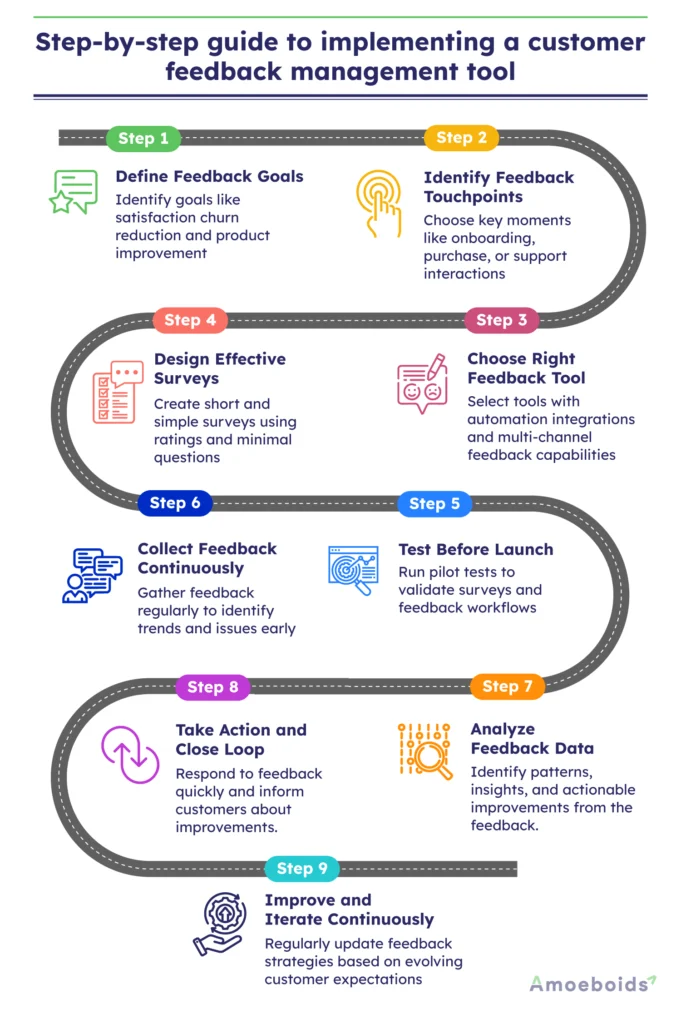
Step 1: Define your feedback goals
Start by asking yourself what you want to learn from your customers. Are you trying to improve product features, measure satisfaction, reduce churn or track support experience? For instance, an e-commerce business might like to learn why some customers abandon their carts before checkout. This clarity will help you choose the right tool and collect the most meaningful feedback
Step 2: Identify key feedback touchpoints
Think about where and when you want to collect feedback. These are the moments when customers are most likely to share helpful insights. Some common touch points include:
- After a purchase
- After a customer service interaction
- During onboarding
- After subscription renewal or cancellation
However, try not to overwhelm customers with too many surveys. Choose touchpoints that matter most to your goals.
Step 3: Choose the right tool for your needs
An ideal online feedback management system should automate the entire survey process, right from your issue and project tracking software. Moreover, look for features like:
- Customizable surveys
- Multi-channel feedback (email, in-app, website, etc.)
- Real-time notifications
- Reporting dashboards
- Integration with tools like Slack, CRM, or helpdesks
In this regard, Amoeboid’s Roadmap and Idea Portal for JSM boasts all the above features. It’s an enterprise feedback management tool that can manage feedback from multiple sources, such as customers, employees and stakeholders. Moreover, you can collect comments and votes on feature requests and organize internal feedback within your Jira service management project.
Step 4: Design simple and effective surveys
Keep your surveys short, clear and easy to answer. Use a mix of rating scales (like CSAT or NPS), yes/no questions and one or two optional open-text questions. Avoid technical language or asking too many questions in one go. Keep it human and friendly.
For instance, instead of asking, “How would you evaluate the efficacy of the onboarding experience?” try “Was it easy to get started?”
Step 5: Test before you launch
Before going live, test your setup with a small group. This helps you check if the survey works, if the questions make sense and if the feedback shows up where you expected it. Testing avoids frustration later, both for you and your customers.
Step 6: Collect feedback continuously
Once you go live, keep the feedback collection funnel active. Continuous feedback helps you spot trends, fix issues early and track progress over time. For example, you might notice recurring feedback about a feature bug within a week, if not sooner. With a continuous feedback management system, you can detect them quicker and keep customers happy.
Step 7: Analyse the data
Now it’s time to turn responses into insights. Look for patterns in what people are saying. Are multiple customers mentioning the same issue, or is satisfaction dropping at a particular point in the journey? Use tools with built-in dashboards, or export the data for analysis and actionable planning.
Step 8: Take action and close the loop
More than 50% of customers will switch to a competitor after only one bad experience. That explains why you need to promptly act on critical feedback and close the loop as soon as possible. Then, tell your customers what’s been done based on their feedback. This shows that their voices matter and builds loyalty.
Step 9: Keep improving and iterating
Customer expectations evolve and your product will too. Review your feedback goals and touchpoints regularly. Keep your surveys fresh and stay open to new ways of listening. After all, implementation is an ongoing process of tuning in, adapting and improving feedback systems to grow with your customers..
Manage customer feedback with Amoeboids
An online feedback management system is your direct line to what your customers truly think and feel. If leveraged correctly, it can help you spot issues early, improve experiences and build lasting loyalty. All it takes is to choose the right customer feedback management tool and follow a clear step-by-step approach to turn everyday feedback into real, meaningful action. It doesn’t have to be complex, just focused and consistent. To effortlessly manage customer feedback from your Jira Service Management, try Amoeboid’s Roadmap and Idea Portal for JSM, which takes a few minutes to get started.
Build your roadmap to success with an ideal enterprise feedback management system. Try it for free.
FAQs
1. Why is it important to use a customer feedback management tool?
You need a single place to gather and organize all your customer comments. A feedback tool turns scattered opinions into clear trends. This helps you spot issues fast, make smarter fixes and show customers you’re listening, building trust and loyalty.
2. How do I analyze the data collected from a customer feedback management tool?
First, group feedback by topic or sentiment. Look for recurring themes and track their frequency over time. Use simple charts or dashboards to spot spikes in complaints or praise. Then share these insights with your team to guide improvements.
3. Can a customer feedback management tool help with customer retention?
Absolutely. By catching problems early, like confusing features or slow support, you can fix them before customers leave. Responding quickly to feedback shows you care, which boosts satisfaction and keeps customers coming back.
4. How does a customer feedback management tool work?
You can connect surveys, chat, email or social media to the platform. It collects and organizes responses in one dashboard. You tag, filter and visualize feedback trends, then assign action items so your team can turn insights into real improvements.