
Introduction: Why Most Changelog Entries Get Ignored
For most SaaS products, the changelog is treated as a technical logbook.
A feature ships, someone writes a quick update, and the entry gets added to the list of product updates. Over time, the page becomes a chronological archive of everything the team has shipped.
But the real problem is that very few users actually read these updates.
Not because users don’t care about product progress – they absolutely do. In fact, customers actively want to know what’s new, what’s improved, and what problems have been solved.
The issue is that most changelog entries are written without thinking about how users consume them.
Common patterns include:
- Generic titles like “May 2026 Updates”
- Long blocks of text that are hard to skim
- No visuals explaining the feature
- No clear next step for the reader
When changelog entries are structured this way, they function more like internal documentation than a communication tool.
A great changelog entry, however, does something very differently.
It explains the update clearly, visually demonstrates what changed, and guides users toward the next action – whether that’s trying a feature, reading documentation, or sharing feedback.
In other words, a high-quality changelog entry has a structure.
In this guide, we’ll break down the anatomy of a great product changelog entry – the elements that transform a simple update into an effective product communication asset.
Why Changelogs Are More Than Product Logs
Historically, changelogs originated in developer communities. They were simple records of changes made between software versions – primarily intended for engineers tracking bug fixes, dependency updates, or version increments.
But modern SaaS products operate very differently.
Today, product teams release updates continuously. Features evolve rapidly, integrations expand, and improvements are shipped every week – or sometimes every day. In this environment, the changelog has evolved from a developer artifact into a core product communication channel.
A well-maintained changelog helps teams:
- Communicate product progress transparently
- Educate users about new capabilities
- Drive discovery of recently released features
- Reinforce trust by showing continuous improvement
In many ways, your changelog acts as a public timeline of your product’s evolution.
When structured well, it can also double as a marketing asset. Every product update becomes an opportunity to explain the value of a feature, show how it works, and guide users toward adopting it.
If you’re interested in broader strategies around communicating product updates, you can also explore our guides on release notes best practices and the differences between changelogs and release notes, which cover how different formats serve different audiences.
Once you understand the role a changelog plays in product communication, the next question becomes straightforward:
What exactly should a great changelog entry contain?
Let’s break down the elements that make a changelog entry truly effective.
The Anatomy of a Great Changelog Entry
Once you start thinking of your changelog as a product communication channel, the structure of each update becomes extremely important.
A poorly structured update might technically announce a feature, but it does little to help users understand what changed or why they should care. A well-structured changelog entry, on the other hand, helps users quickly grasp the value of the update and encourages them to explore it further.
Over time, strong changelog entries tend to share a common structure. Below are the elements that consistently appear in changelogs that successfully engage users and communicate product progress effectively.
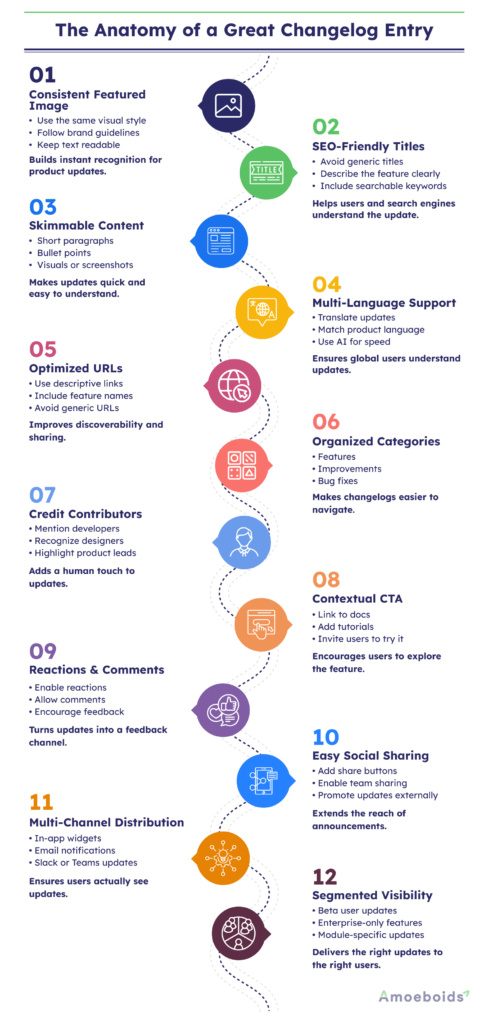
1. Use a Consistent Featured Image
Every changelog entry should ideally include a featured image.
This image does not have to be complex. In fact, many successful SaaS products use very simple visual templates where the layout remains the same across updates and only the text changes.
The key objective is visual consistency.
When users repeatedly see the same visual style associated with your product updates, it reinforces brand identity and improves recognition. Over time, your changelog entries become instantly recognizable across channels such as email newsletters, social media posts, or in-app announcements.
A good featured image should:
- Follow your brand design system
- Clearly reference the feature or improvement
- Be readable even in small previews
Think of it less as an illustration and more as a visual headline for the update.
2. Write SEO-Friendly Update Titles
The title of your changelog entry is one of the most important elements.
Many teams default to generic titles like:
- “May 2026 Product Updates”
- “Version 4.3 Release”
While these titles may work internally, they provide very little context for users – and they offer almost no value from an SEO perspective.
Instead, a changelog title should ideally describe the specific capability being introduced or improved.
For example –
- Generic title: “May 2026 Updates”
- More descriptive title: “Introducing Bulk Workflow Automation for Jira Projects”
Descriptive titles help users immediately understand the value of the update. They also allow individual changelog entries to appear in search results when users are researching a specific capability.
That said, this isn’t a rigid rule. Some teams prefer monthly summaries because their users expect them. The key is to align the title format with how your audience consumes product updates.
3. Make the Content Skimmable
Users rarely read changelog entries line by line.
Most people scan for key information. If the update appears dense or difficult to read, they’ll simply move on.
To improve readability, structure the body of your changelog entry for quick scanning.
Effective changelog entries typically include:
- Short paragraphs
- Bullet points where appropriate
- Clear headings or emphasis on important points
Visual elements are particularly useful here. Screenshots, short demo videos, or animated GIFs can often explain a feature much faster than text alone.
Stylized screenshots that highlight the exact UI change can also make the update far easier to understand.
The goal is to ensure that someone can understand the essence of the update within a few seconds of viewing the product update entry.
4. Support Multiple Languages
If your product serves users across different regions, your changelog should ideally reflect that global audience.
Many SaaS teams publish updates only in English, even when their product interface is available in multiple languages. This creates a mismatch – users can navigate the product in their preferred language but must rely on English to understand what has changed.
Providing changelog entries in multiple languages helps ensure that updates remain accessible to your entire user base.
These translations don’t necessarily need to be written manually. Many teams now rely on AI-generated translations to quickly produce localized versions of product updates. While they may not always be perfect, they are often sufficient to communicate the essence of the change.
Over time, multilingual changelogs can also improve discoverability in international search results, helping users find updates in their native language.
In short, if your product supports multiple languages, your changelog should ideally follow the same principle.
5. Optimize the Changelog URL
Each changelog entry typically has its own dedicated URL. This presents a valuable opportunity that many teams overlook.
Instead of using generic URLs such as:
/updates/may-2026consider using URLs that describe the specific update:
/updates/ai-feedback-taggingor
/updates/workflow-automation-for-jiraWhen URLs reflect the actual feature being introduced, they become easier to share and easier to understand when seen outside the context of your website.
More importantly, descriptive URLs allow changelog entries to function as searchable content pages. If someone is researching a feature your product offers, a well-structured changelog entry can potentially appear in search results and introduce them to your product.
This turns individual product updates into small but valuable product marketing assets.
6. Organize Updates with Categories and Projects
As products grow, changelogs can quickly become difficult to navigate.
Without proper organization, users may need to scroll through dozens – or even hundreds – of updates to find something relevant to them.
This is where classification becomes extremely useful.
Most effective changelogs allow entries to be organized using categories, projects, or tags.
Common examples include:
- Features
- Improvements
- Bug fixes
- Integrations
- Performance updates
Some teams also categorize updates by product modules or specific projects within the platform.
This structure allows users to filter updates based on what matters to them. For example, a developer might want to see only integration updates, while a product manager might be more interested in newly released features.
Over time, this classification system makes your changelog far easier to browse and turns it into a structured archive of your product’s evolution.
7. Credit the Contributors Behind the Update
Behind every product update is a group of people who designed, built, tested, and shipped the feature. Yet most changelog entries present updates as if they appeared out of nowhere.
Including contributors in your changelog entries can make product updates feel far more human.
This could include:
- The developer who implemented the feature
- The designer who worked on the interface
- The product manager who led the initiative
Some teams go a step further and include links to contributors’ GitHub profiles, LinkedIn pages, or personal websites. This allows users to connect the product with the people building it.
While this may seem like a small addition, it can have meaningful benefits. It reinforces transparency, celebrates the team behind the product, and helps users feel a stronger connection with the people responsible for the improvements they experience.
For developer-focused products in particular, recognizing contributors is often appreciated by the community.
8. Include a Contextual Call-to-Action
A changelog entry should not simply describe an update – it should also guide the reader toward the next step.
This is where a contextual call-to-action (CTA) becomes important.
The CTA does not necessarily need to promote a paid upgrade or push users toward a sales funnel. Instead, it should help users explore the update in greater depth.
Common examples include:
- Linking to the feature documentation
- Directing users to a detailed tutorial or walkthrough
- Providing a demo video
- Inviting users to share feedback on the feature
For instance, if a new integration has been released, the changelog entry could link directly to the documentation that explains how to configure it.
The goal is to ensure that users who are interested in the update can immediately move from learning about the feature to actually using it.
9. Allow Reactions and Comments
Changelogs are often treated as one-way announcements. But when users are able to react or comment on updates, the changelog becomes something more valuable: a feedback channel.
Allowing users to leave reactions – such as likes, emojis, or quick acknowledgements – can provide useful signals about which updates resonate the most with your audience.
Comments, on the other hand, allow users to:
- Ask clarifying questions
- Share early feedback about a feature
- Suggest improvements
Not every changelog entry will receive engagement, especially in the early stages. But over time, consistent publishing and open communication can help turn your changelog into a place where meaningful product conversations happen.
These interactions also provide valuable insights for product teams, revealing how users are responding to newly shipped capabilities.
10. Make It Easy to Share Updates on Social Platforms
Product updates don’t have to stay confined to your changelog page.
In many cases, a well-written changelog entry can also become a piece of shareable content. Adding social sharing buttons makes it easier for users, team members, and advocates to distribute updates across social platforms like LinkedIn, X (Twitter), or developer communities.
This small addition can significantly extend the reach of your product announcements. Instead of relying solely on your own marketing channels, your users and employees can help amplify the update organically.
For example, a developer who finds a newly released feature useful might share the changelog entry with their network. Similarly, product managers or community members may reference the update in discussions or forum posts.
Over time, this sharing behavior can turn your changelog into a steady stream of product marketing touchpoints, helping potential users discover your product through real-world updates.
11. Distribute Changelog Updates Across Multiple Channels
Publishing an update on your changelog page is only the first step.
To ensure users actually see your updates, it helps to distribute them across the channels where your audience already spends time.
Many product teams now extend their changelog distribution through:
- In-app changelog widgets, so users can discover updates while using the product
- Email notifications, which alert subscribers whenever new features are released
- Slack or Microsoft Teams announcements, especially for enterprise or team-based products
By distributing updates through multiple channels, changelog entries become far more visible. Instead of expecting users to visit the changelog page regularly, the updates reach them directly within the tools they already use.
This approach also ensures that important product improvements don’t go unnoticed.
12. Control Visibility for Different User Segments
Not every product update is meant for every user.
Some updates may be relevant only to specific customer groups – for example:
- Enterprise customers
- Beta testers
- Users of a particular product module
Having the ability to control who can see specific changelog entries can be extremely useful in these situations.
Segmented visibility allows teams to publish updates selectively, ensuring that the right information reaches the right audience. For instance, a feature in early beta might only be visible to a group of invited testers, while a major public release would appear in the main changelog for everyone.
This flexibility allows product teams to use their changelog for a wider range of communication scenarios, from early experimentation to full-scale product launches.
Turning Your Changelog into a Product Communication System
When these elements come together, your changelog stops being a simple archive of product updates and becomes something much more powerful.
Instead of serving only as a historical record, the changelog begins to function as a product communication system – one that helps users stay informed, discover new capabilities, and engage with the evolution of your product.
A well-structured changelog can support multiple goals simultaneously:
- User education – helping customers understand how new features work
- Feature discovery – highlighting improvements that users may otherwise miss
- Transparency – showing that the product is actively evolving
- Feedback collection – enabling users to react and share their thoughts
Over time, this turns your changelog into a valuable bridge between the product team and its users.
Of course, implementing all of these capabilities manually can be difficult. Maintaining structured updates, distributing them across channels, and keeping everything organized requires the right tooling.
For teams that rely heavily on Jira for development workflows, tools like Automated Release Notes & Reports (ARNR) make it possible to generate structured product updates directly from Jira issues and automate how those updates are published.
For broader SaaS teams that want a dedicated platform for managing changelogs and product communication, solutions like Olvy help teams publish updates, collect feedback, and distribute changelogs across multiple channels such as web pages, in-app widgets, email notifications, and collaboration tools.
In both cases, the goal is the same: to make changelog publishing consistent, structured, and easy to maintain as your product continues to evolve.
Conclusion: Your Changelog Is More Than an Update Log
A changelog may appear to be a simple list of product updates, but when structured thoughtfully, it becomes far more valuable.
Each changelog entry is an opportunity to explain progress, highlight improvements, and help users understand how your product continues to evolve. The difference between an overlooked update and a meaningful product communication often comes down to how the entry is structured.
As we’ve seen, effective changelog entries tend to include clear titles, visual context, skimmable content, meaningful classification, and opportunities for engagement. They are easy to discover, easy to understand, and easy to share.
When these elements come together consistently, the changelog becomes more than an archive – it becomes a system that helps users stay connected with your product.
For teams working within Jira environments, solutions like Automated Release Notes & Reports (ARNR) can help automate structured product updates directly from development workflows. For SaaS teams looking to manage changelogs as part of their broader product communication strategy, platforms like Olvy provide dedicated capabilities for publishing, distributing, and analyzing product updates.
In the end, the goal of a changelog isn’t simply to record what changed.
It’s to help users understand why those changes matter.