Project Plan
Report
Turn a full Jira project into a structured plan
stakeholders can actually follow, epics, risks, and
timeline, without building it slide by slide.
What is a Project Plan Report?
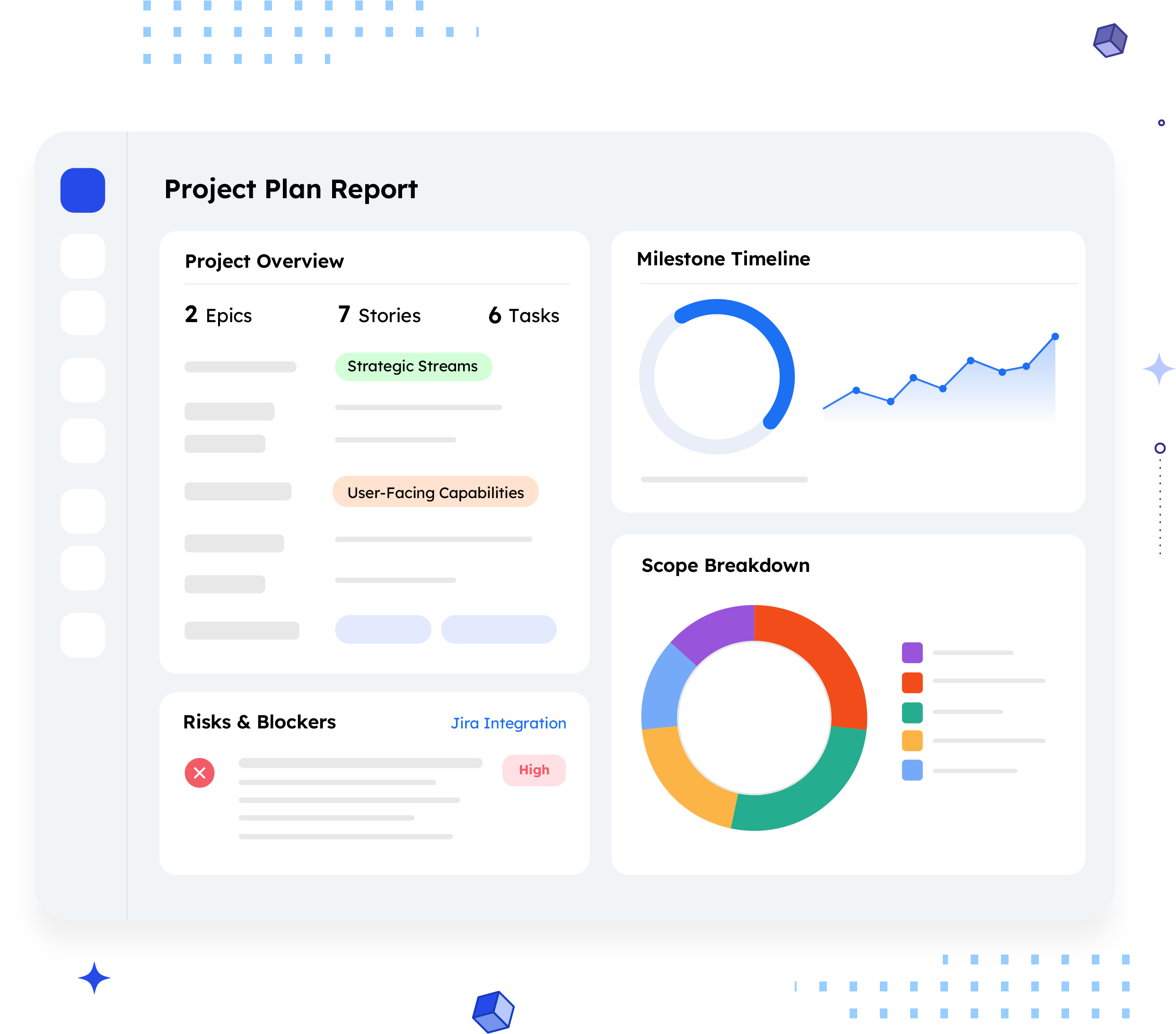
A Project Plan Report summarizes an entire Jira project at the plan level, its scope (epics, stories, tasks), the roadmap of epics with descriptions, known risks with recommended actions, and a milestone timeline, all in one document.
Where an Epic Progress Report zooms in on one Epic, a Project Plan Report zooms out to the whole project. It's the document you hand to a stakeholder before work starts, or revisit whenever scope, risk, or timeline needs to be re-confirmed. It answers a different question than a status update: not "where are we," but "what are we building, in what order, and what could go wrong along the way."
Who should receive it?
Anyone who needs to approve, fund, or plan around the project
before or during delivery.

Sponsors and leadership
Need to see scope and timeline before committing budget or headcount.
Customers / service delivery contacts
When the project is client-facing, this becomes the shared reference for what was agreed.

PMOs and program managers
Use it to check a project's plan against portfolio commitments.
Delivery teams
A single source of truth for scope and risk ownership across epics, especially at kickoff.
When should it be sent?


At project
kickoff
so everyone starts from the same scope, roadmap, and risk list

Before a funding
or go/no-go
decision
moving into review,
or right before a
release
At a major
milestone
to confirm the
timeline still holds
When scope
changes
a new epic, a dropped
one, or a shifted end date
At contract
or SOW review
a final summary of
what shipped and
what got dropped
Essential sections, with examples
Six sections, moving from what the project is to how it will land.

Project Overview
Project name and key, the basic identity of the plan.
Example:
Agro Corp · Project Key ACM

Work Overview
A count of epics, stories, and tasks, giving an immediate sense of size and shape before anyone reads a single description.
Example:
2 Epics (strategic streams of delivery) · 7 Stories (user-facing capabilities) · 6 Tasks (supporting engineering work)

Project Roadmap — Epics
Each epic with its priority, key, summary, and a plain-language description of what it enables.
Example:
ACM-19, AI-Powered Incident Summary Generation — "Enable users to automatically generate executive-level incident summaries using AI, reducing manual effort."

Risks & Blockers
Not a generic risk register, risks tied to specific epics, paired with recommended actions split by who owns them.
Example:
Inaccurate summaries, bias/privacy leakage, poor stakeholder trust" --> Customer: define acceptance metrics, run a phased pilot. Service Provider: add human-in-the-loop review and PII safeguards.

Timeline
Key milestones with dates and short notes, so the reader knows not just when, but why each date matters.
Example:
Mid Milestone, 01 Dec 2026 — "Feature-complete for AI summaries."

Conclusion
A short closing statement tying scope, risk, and timeline together, and naming what teams should do next.
Common mistakes

Listing risks without owners.
A risk with no assigned action on either side just sits there until it becomes a blocker.
Treating epic counts as the whole picture.
"2 epics, 7 stories" means nothing without the roadmap - descriptions that explain what each one actually delivers.
Vague milestones
A date with no note attached tells a sponsor when something happens, not why it matters or what "done" looks like.
Skipping the service-provider side of risk.
Recommendations aimed only at the customer leave half the mitigation plan missing, and make the provider look like it's not accountable for anything.
No conclusion
Ending on a risk table leaves the reader without a clear "here's what happens next."
Reusing a plan without updating it.
A Project Plan Report is a snapshot. Sharing last month's version at a new milestone review undermines trust in the whole document.
How to automate it with ARNR
Three steps replace the day it usually takes to assemble a plan like this manually.
Connect Jira
Link your Jira instance once. ARNR reads Epics,
issues, and status directly, no re-entry.
Pick the Project
Choose the project by key or name and select
this template from the library.
Get your report
Link your Jira instance once. ARNR reads Epics,
issues, and status directly, no re-entry.