Cross-Projects Release Notes Report
Turn releases from five different Jira projects into a
single rollup; no need to check each project separately
to see what shipped.
What is a Cross-Project Release Notes Report?
A Cross-Project Release Notes Report consolidates release activity from multiple Jira projects into
one document. It's prepared by a named owner and dated as current. It provides a single point of
reference for Product and PMO stakeholders to track delivery, issue health, and dependencies.
This one zooms out across the whole portfolio. It makes no claims about any version or sprint scope
and reflects the full current state of each project in scope. It answers a different question than a
single-project report: not "what shipped here", but "what shipped everywhere, and how does it
connect?"
Who should receive it?
Anyone responsible for a portfolio of products, not a single release.

Product managers
Owns multiple projects and needs one rollup instead of five separate reports to check.

PMO leads
Uses it to confirm release activity lines up with portfolio-level commitments and roadmap themes.

Product leadership
Wants a fast read on what shipped across the product line without opening every project individually.

Cross-functional stakeholders (Sales, CS)
Refer to it when a customer question touches more than one product area.
When should it be sent?


At the end of every release cycle
a consolidated view generated once the same window closes across all included projects.

Ahead of a roadmap or portfolio review
so product leadership walks in already knowing what shipped where.

When two projects ship related or dependent work
surfaced explicitly so nothing gets missed between teams.

At quarter-end
rollups
as the portfolio-level counterpart to each project's individual release notes.
Essential sections, with examples
Five sections, moving from the top-line summary down to the one action leadership should take.

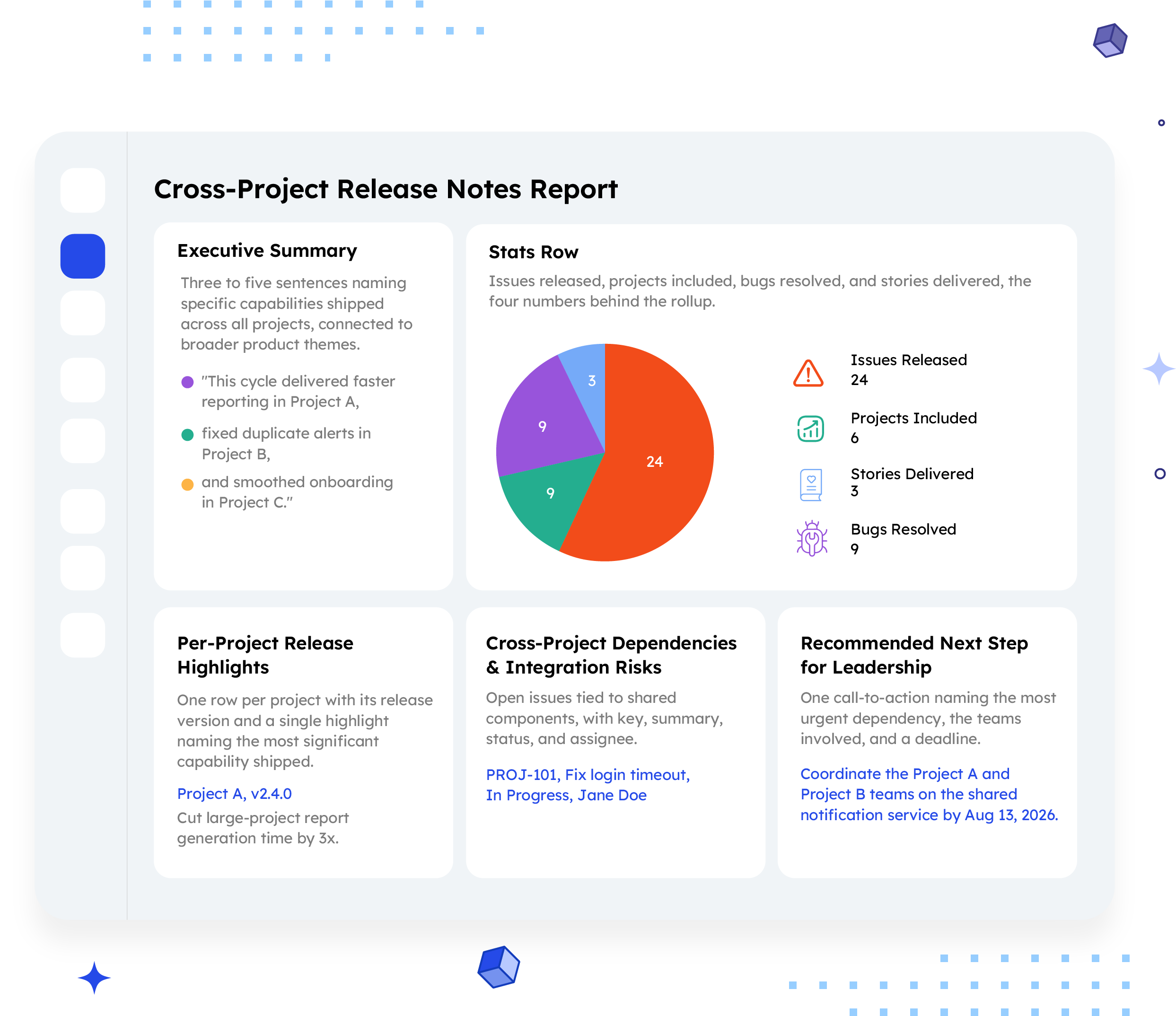
Executive Summary
Three to five sentences naming specific capabilities shipped across all projects, connected to broader product themes.
Example:
"This cycle delivered faster reporting in Project A, fixed duplicate alerts in Project B, and smoothed onboarding in Project C."

Stats Row
Issues released, projects included, bugs resolved, and stories delivered, the four numbers behind the rollup.
Example:
24 Issues Released, 6 Projects Included, 9 Bugs Resolved, 3 Stories Delivered

Per-Project Release Highlights
One row per project with its release version and a single highlight naming the most significant capability shipped.
Example:
Project A, v2.4.0, "Cut large-project report
generation time by 3x."

Cross-Project Dependencies & Integration Risks
Open issues tied to shared components, with key, summary, status, and assignee.
Example:
PROJ-101, Fix login timeout, In Progress, Jane Doe

Recommended Next Step for Leadership
One call-to-action naming the most urgent dependency, the teams involved, and a deadline.
Example:
"Coordinate the Project A and Project B teams on the shared notification service by Aug 13, 2026."
Common mistakes

Using generic buckets instead of named capabilities.
"Various improvements" or "several bug fixes" tells a product manager nothing worth reading.
No cross-project summary.
Jumping straight into per-project rows skips the connective narrative this report exists to provide.
Missing links between projects.
This report is intended to close the gap created by two projects that touch the same component without a flag.
A recommendation with no owner or deadline.
"Coordinate on this" without naming who and by when leaves leadership with nothing to act on.
Treating it as a collection of separate reports stapled together.
If each project's row reads like a separate report, the rollup is no better than checking each one individually.
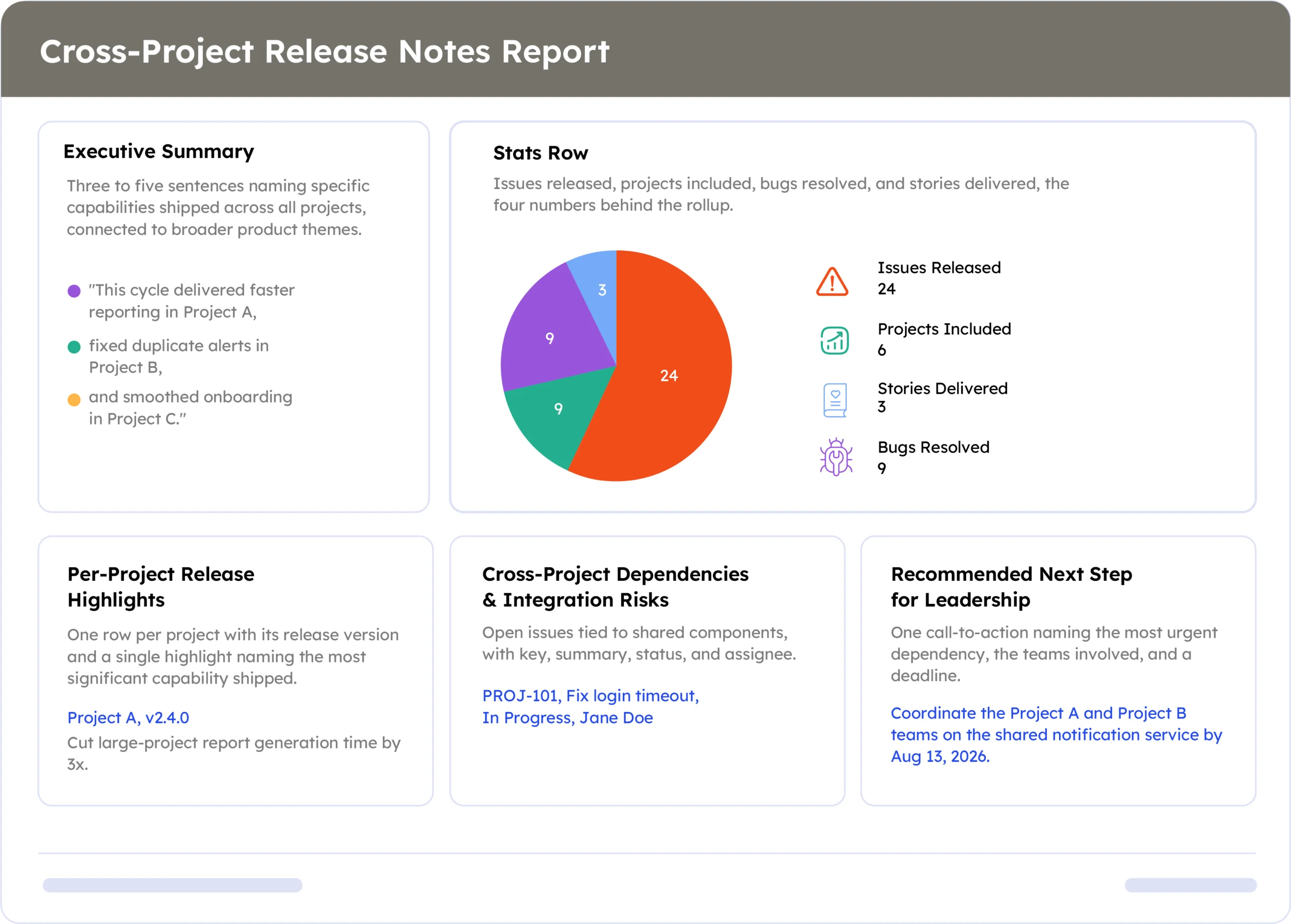
Example report
A real report, recreated here from live Jira data across multiple projects. Swap in a full screenshot once the final export is ready.
How to automate it with ARNR
Three steps replace the manual work of checking every project separately.
Connect Jira
Link each Jira project to ARNR once. It reads releases, issues, and status across all of them.
Pick the projects and window
Choose which projects to roll up and the date range, then select this template from the library.
Get your report
ARNR consolidates every release into one summary, flags dependencies, and hands you a PDF or live link.